Spreadsheets → Web Apps
Your Spreadsheets are
Your App Studio.
Turn Excel workbooks and Google Sheets into full-stack web apps. Design forms, validation rules, and security logic instantly—No Code. AI Optional.
If you can structure a spreadsheet, you can build a web app.
1Spreadsheets break — copies, typos, no control.
2Start from your workbook, or a prompt you approve.
3A real app you control — validated, secure, audited.
What Sheetward is for
Build apps for processes standard software doesn’t cover—and that are too important to manage in shared spreadsheets.
How to think about it
Your workbook is the blueprint —
not the database.
Sheetward reads your Excel workbook the way a builder reads an architect's drawing. Each sheet in the workbook specifies the application you want:
Form_sheets become data-entry forms — fields, sections, line items.List_ / Master_sheets become master data that backs dropdown fields.Rules_rows become field validations, conditional logic and business keys.Formula_rows become computed fields, updated live as your team types.
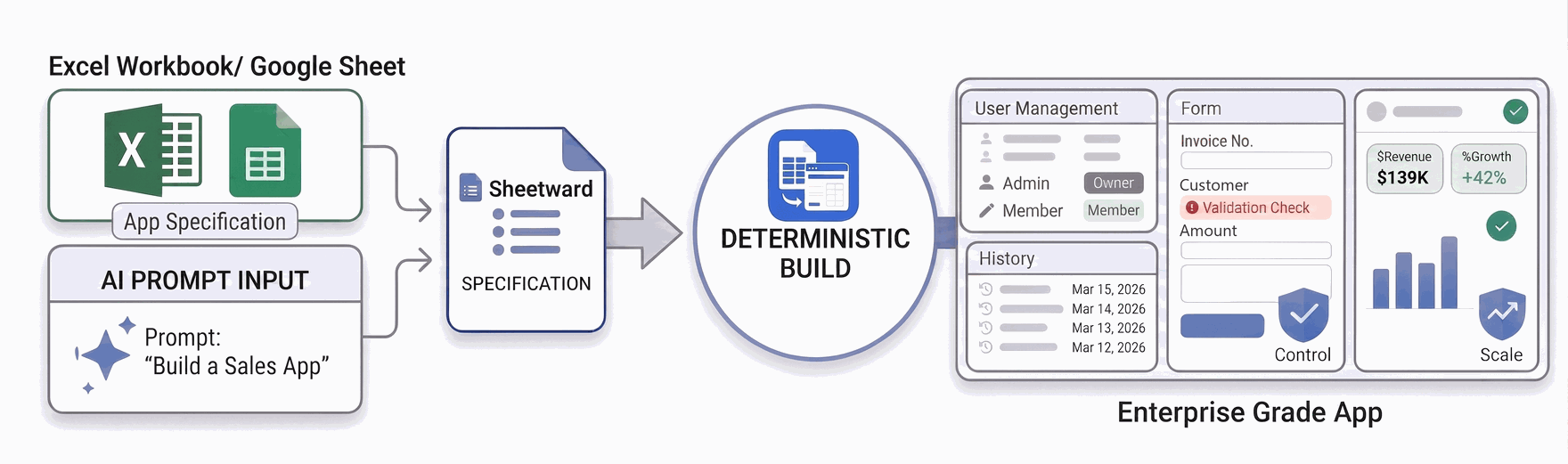
The Spreadsheets are design specifications for your Web App. The Web App is created instantly when the Excel Workbook or Google Sheets are imported into Sheetward.
Sheetward builds from your workbook’s business logic—not AI guesswork.
How it works
Spreadsheets in, full-stack app out.
- 1
Design in Excel
Lay out your application as ordinary sheets: Form_ tabs for input forms, List_ tabs for master data, Rules_ for validations and conditional logic, Formula_ for calculations. No new tool to learn — the spreadsheet is the designer. Prefer to start from a description? Draft with AI writes the specification workbook for you to review — AI optional, never required.
- 2
Upload & review
Sheetward reads the blueprint and shows you the generated schema — every field, data type, dropdown and rule it detected. Confirm, and the app is live with its own database, ready for your team.
- 3
Share & work
Invite teammates with roles, enter records in validated forms or bulk-import them, and export to Excel, CSV or JSON any time. Update the design later by uploading a revised workbook — records are preserved.
Almost zero build time
Sheetward builds your app the moment you upload the workbook. There is nothing to compile, generate or wait on.
Rapid prototyping
Reshape a sheet, upload again, and iterate on the live app in minutes — your records are preserved each time.
Immediate time-to-value
Your team enters validated data the same day. No dev queue, no project plan, no waiting for a release.
See it work
Pick a demo and click through it at your own pace — no video to load, nothing to install.
 Interactive demo
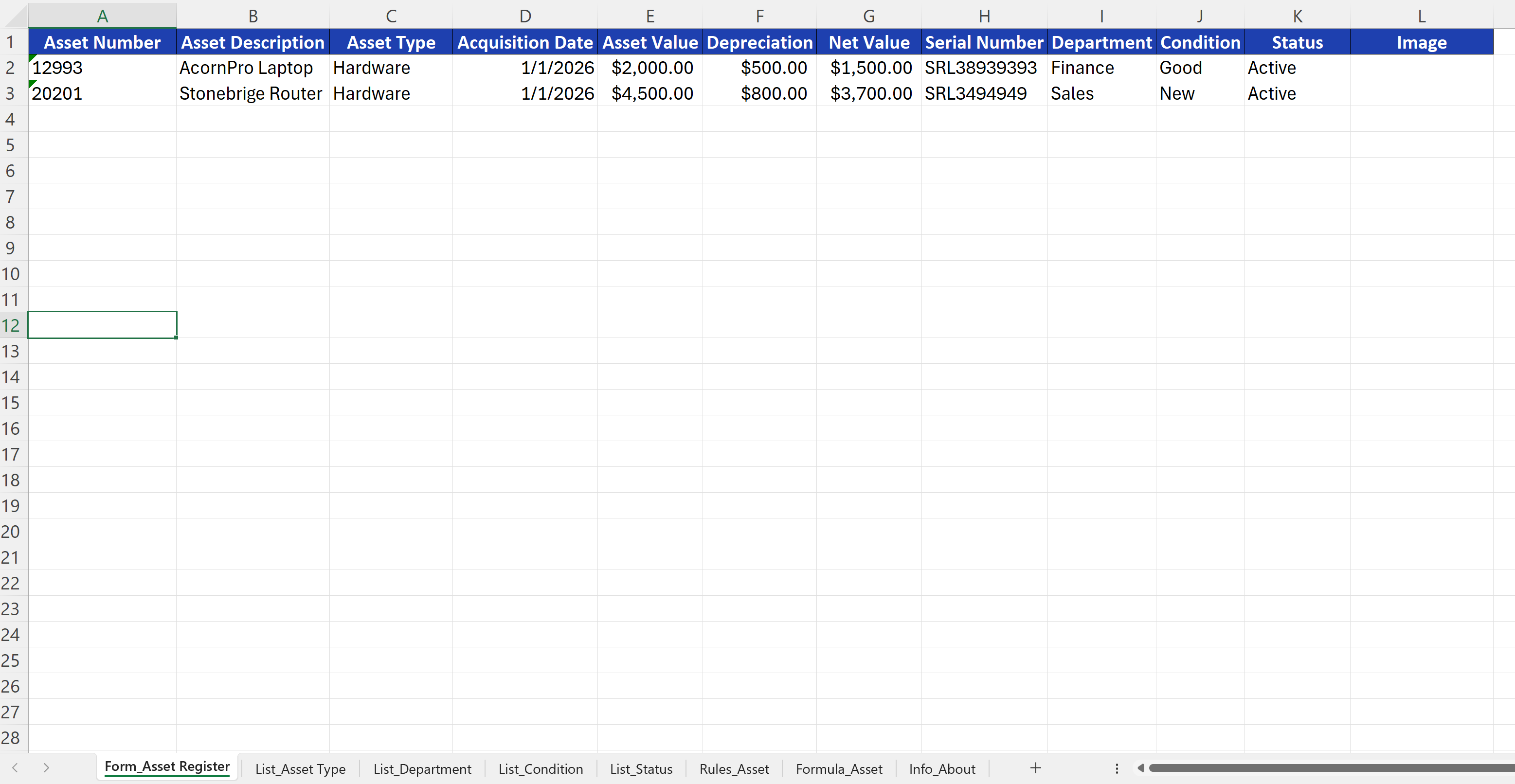
From Spreadsheets to App
Upload the workbook you already have. Sheetward reads its tabs and builds a working web app — no code, no AI guesswork.
 Interactive demo
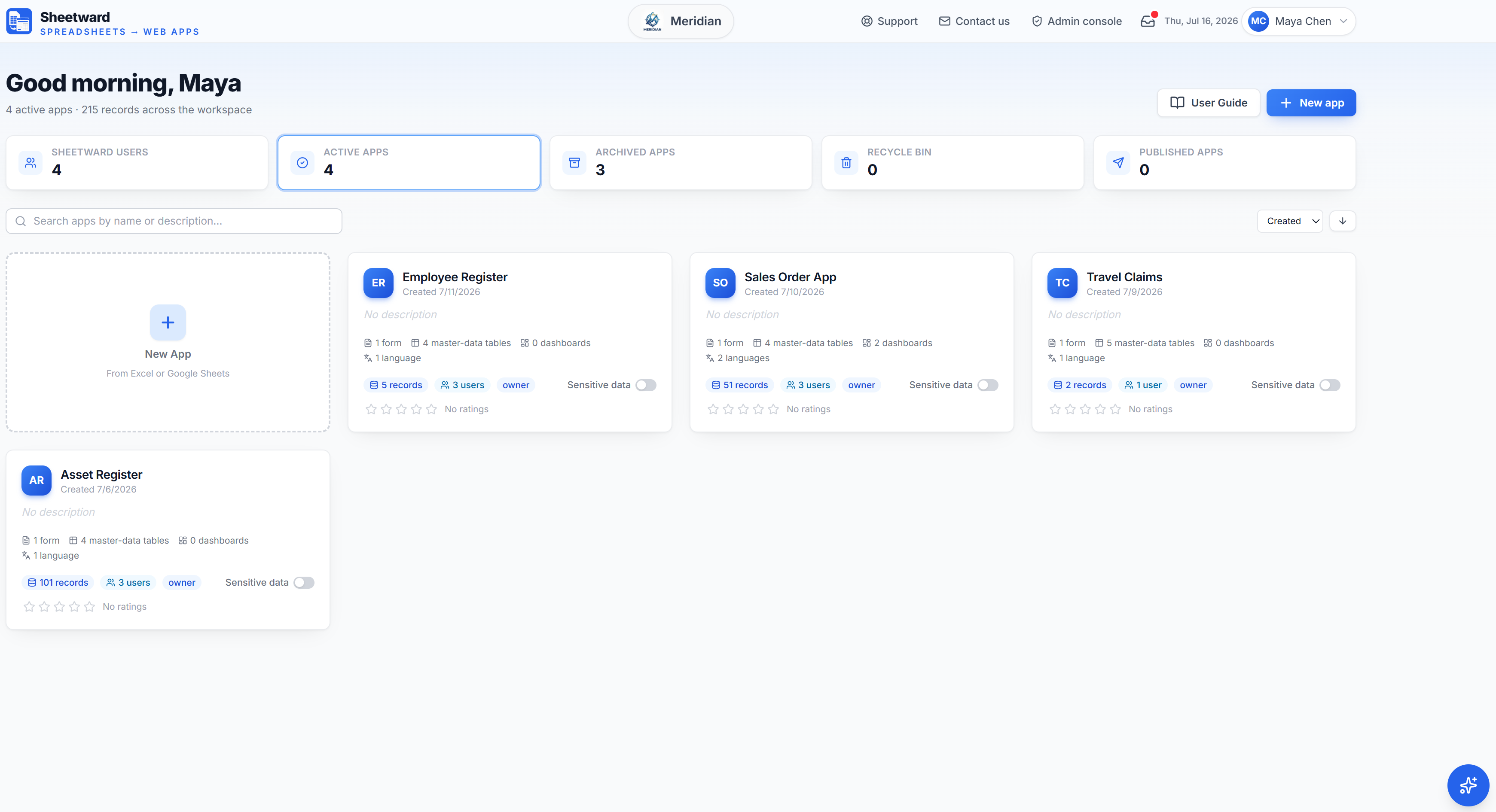
Workspace and Apps
Sign in in your language, run several independent apps under one workspace, invite teammates with roles, and get instant AI help — all in one place.
 Interactive demo
Out-of-the-box features
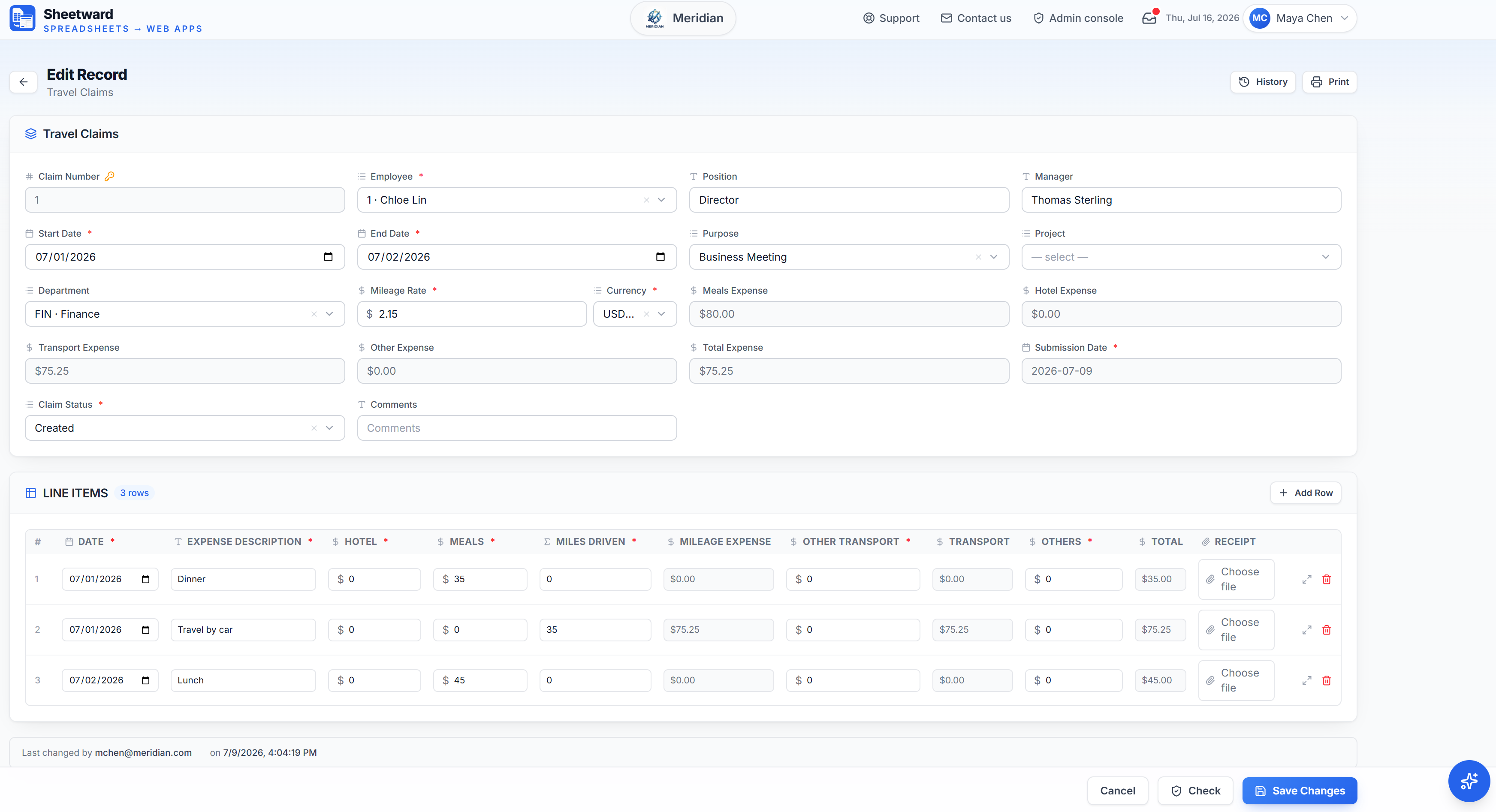
Forms, rules, dashboards, masked sensitive data and multi-language — all from the workbook, no code.
 Interactive demo
Draft with AI
No workbook yet? Describe the app and the AI drafts the App Specification workbook — you review and approve, and Sheetward builds deterministically. AI optional.
Want to start from a working example? Browse the Template Gallery — six ready-made App Specifications you can download and adapt.
1. Start with an ordinary Excel workbook — here, an asset register with a column per field.
The workbook you already have is the design; there is no new tool to learn.
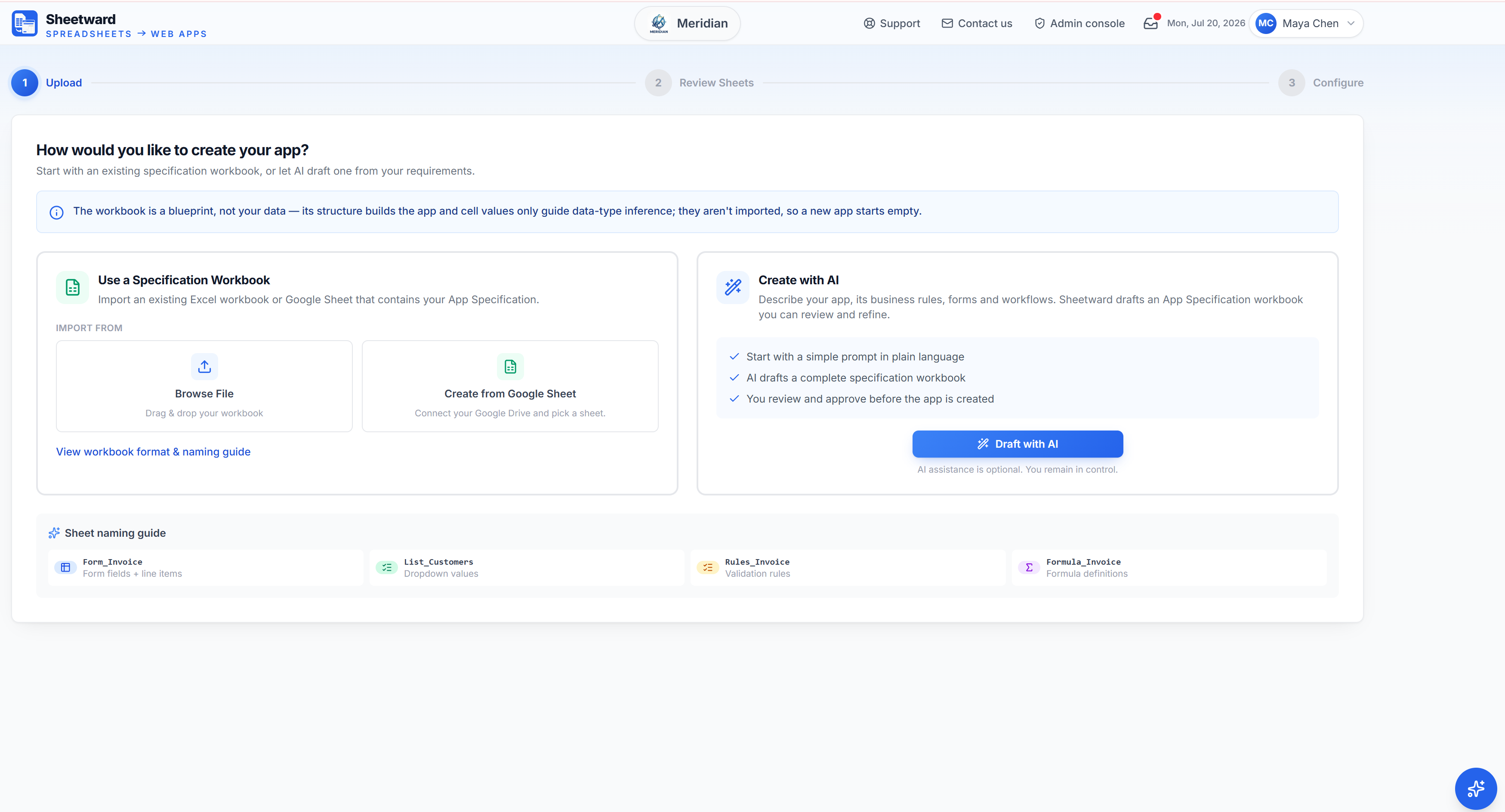
2. Drag the workbook into Sheetward, or browse for it.
It reads the blueprint in seconds — deterministically, with no AI guesswork.
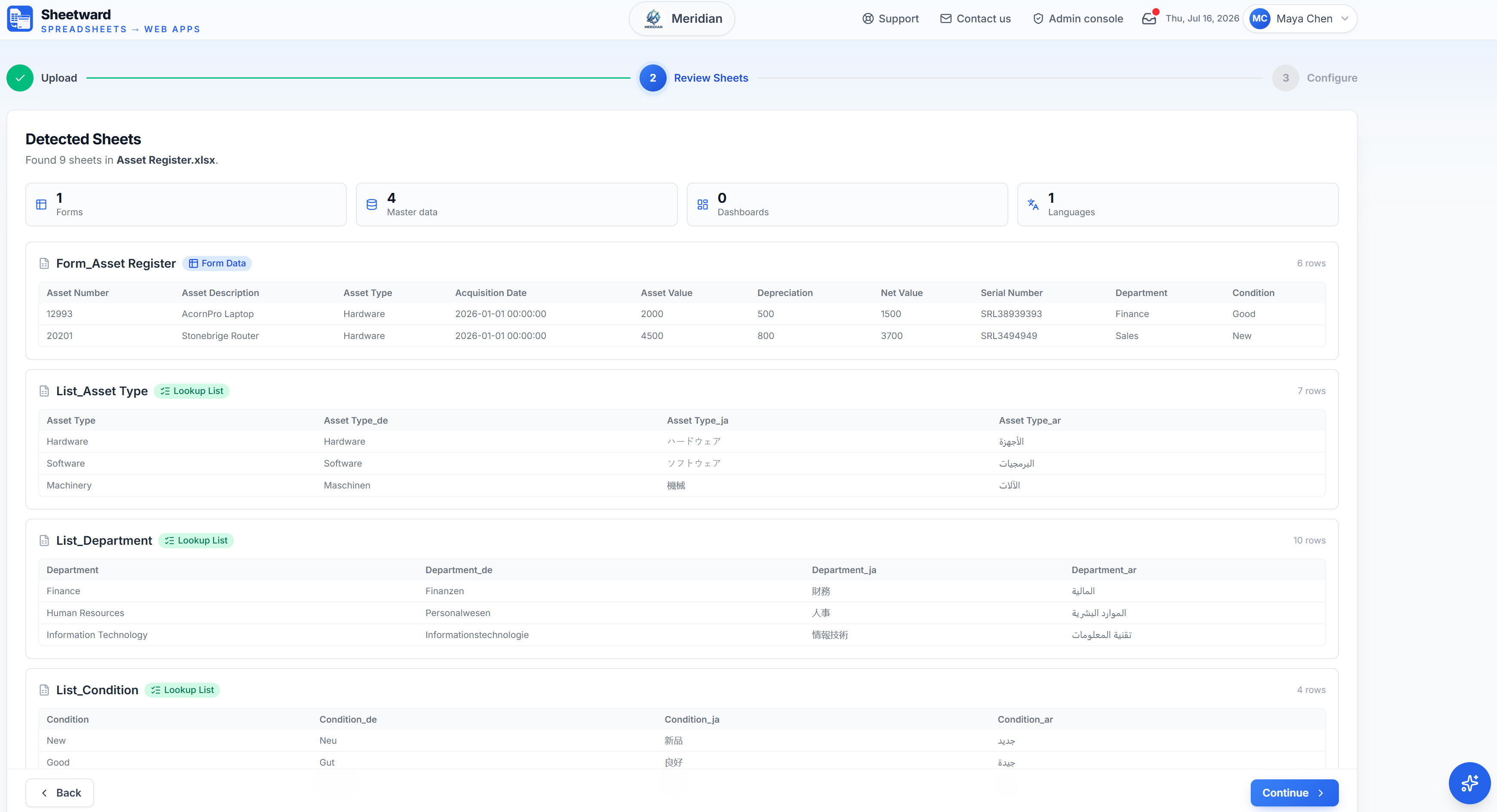
3. Sheetward shows what it found: one form, four lookup lists and a language.
Each tab’s role comes from its name — Form_, List_, Rules_, Formula_.
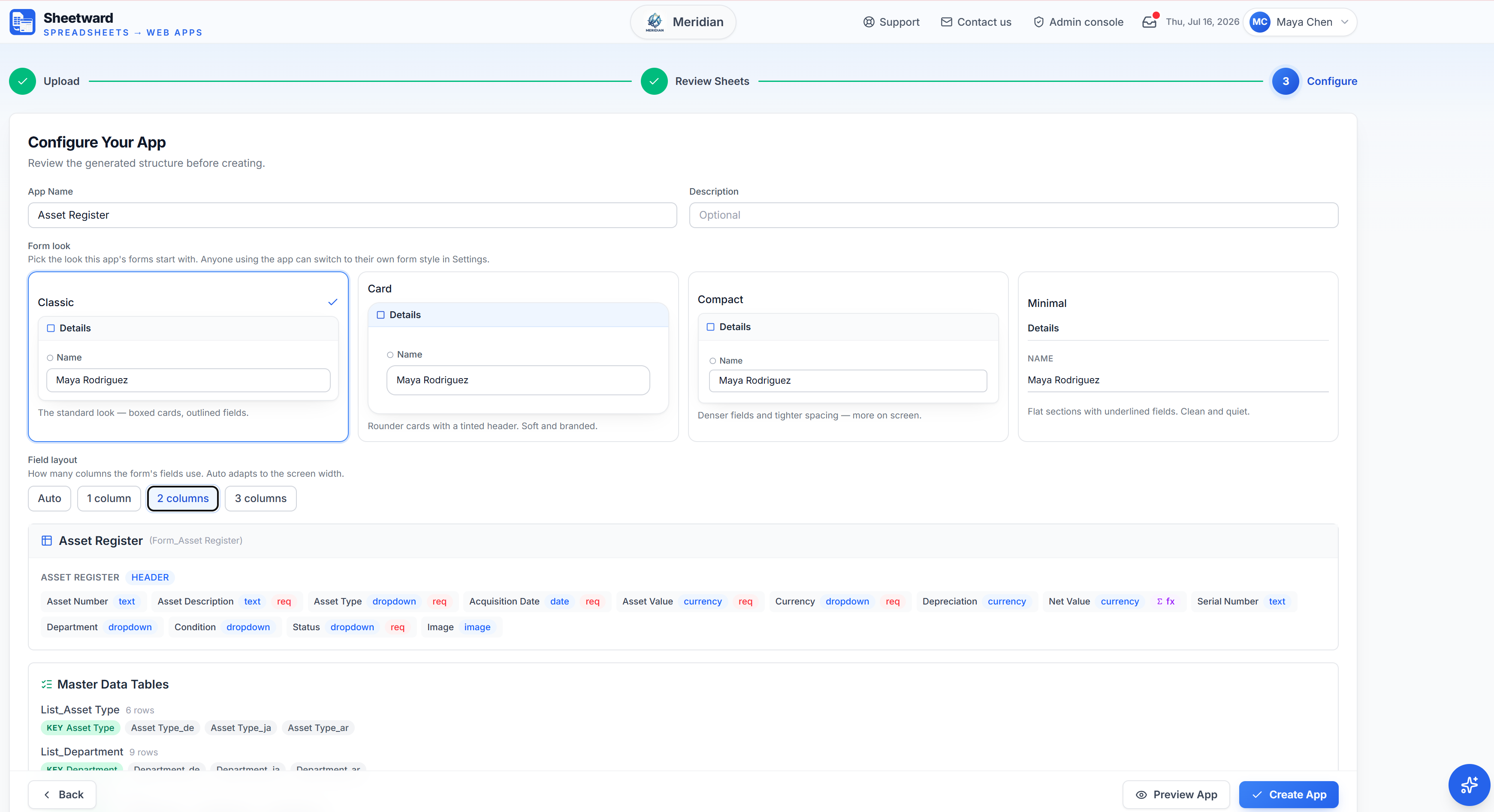
4. Check the fields, data types and rules it inferred, then pick a form look.
Text, dropdowns, currency, dates and formulas — all detected; adjust anything before you create.
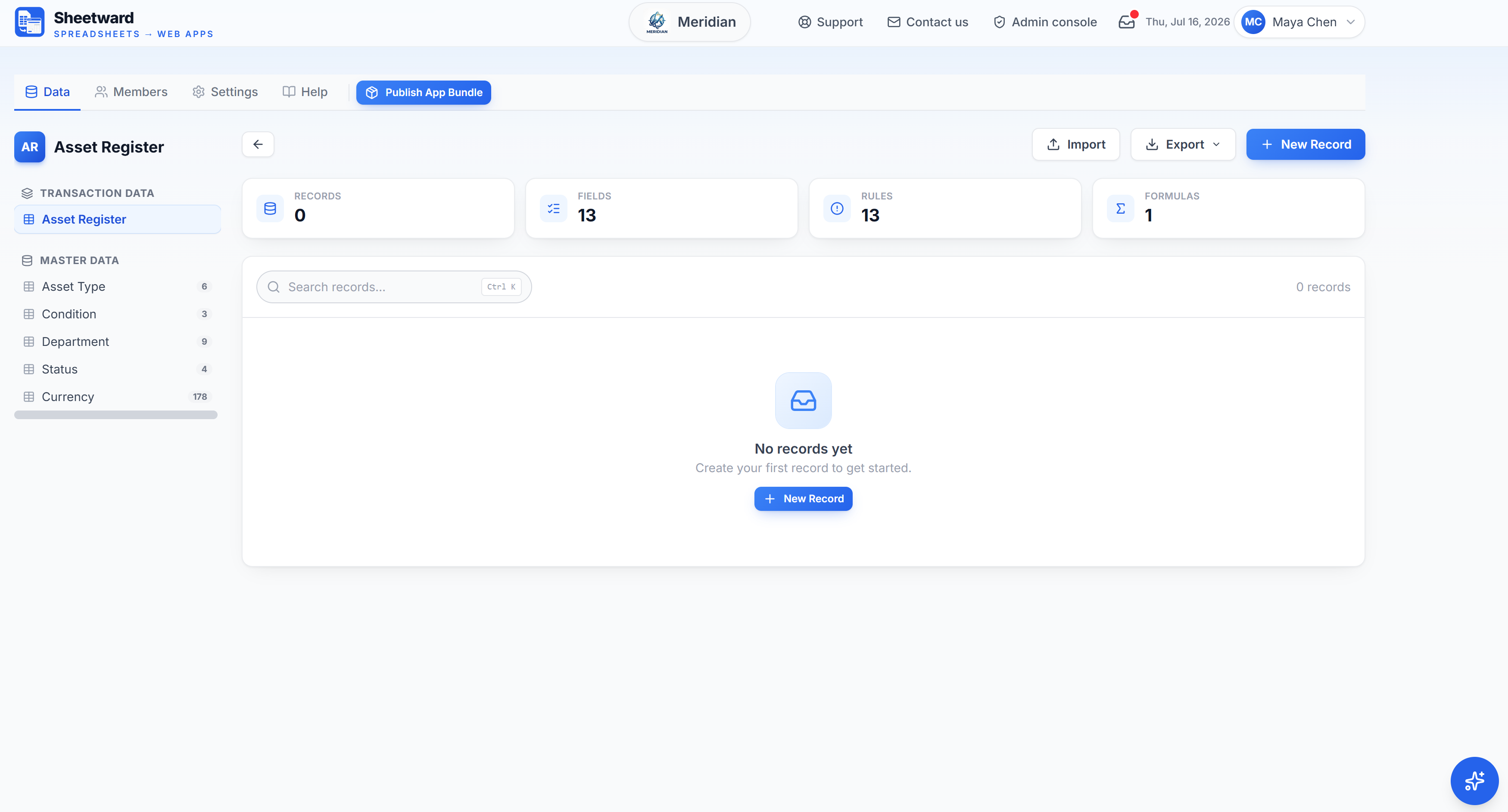
5. The Asset Register app is live with its own database — a form configured with fields, rules & validations, formulas and lookups.
Thirteen fields, thirteen rules and a formula, plus every lookup list as a dropdown source.
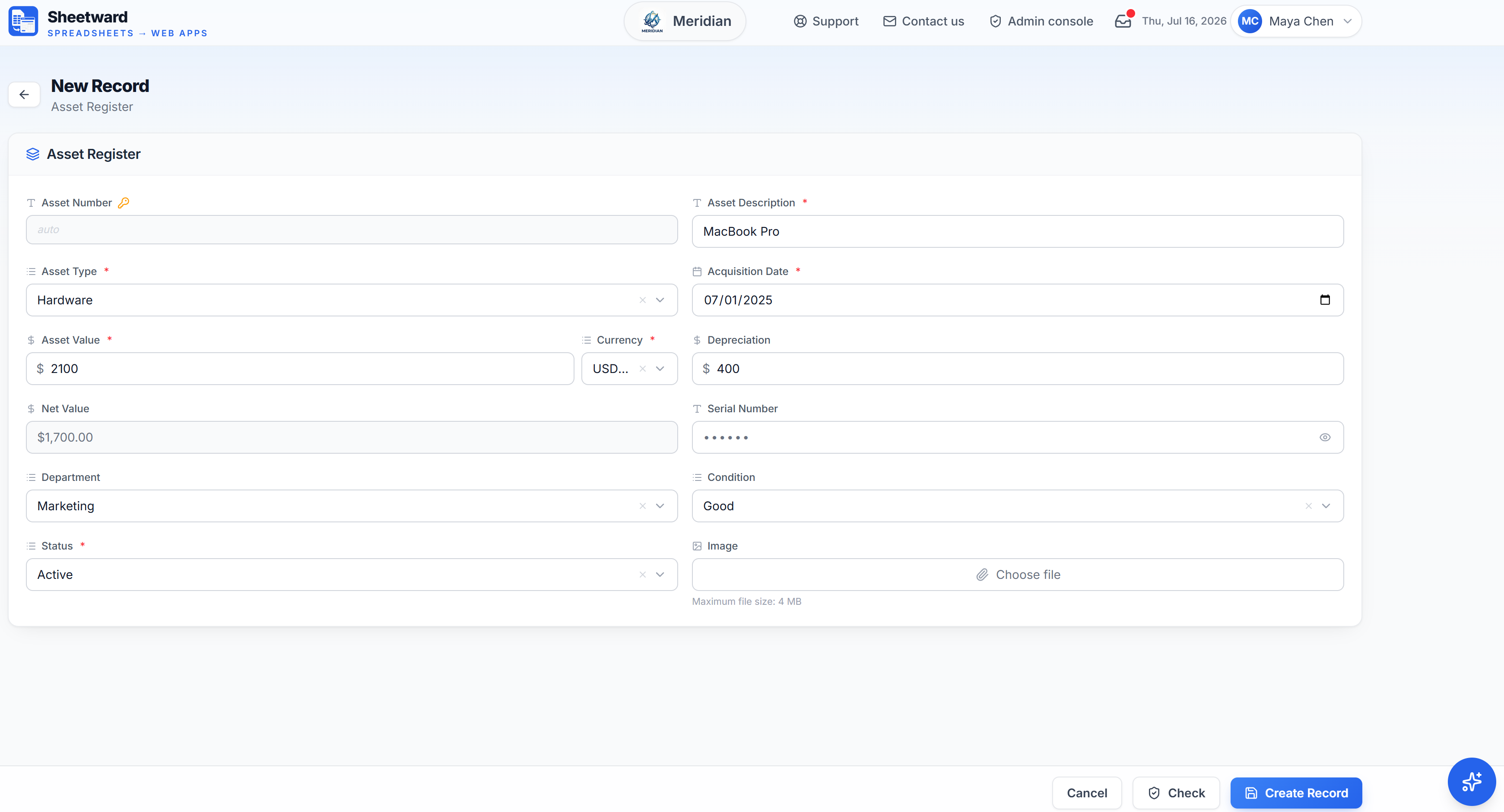
6. You can add records in a validated Asset Register form with dropdowns, required fields and live calculations.
In this form, Net Value is calculated automatically, Asset Number is auto-generated, Serial Number is masked and has multiple required fields.
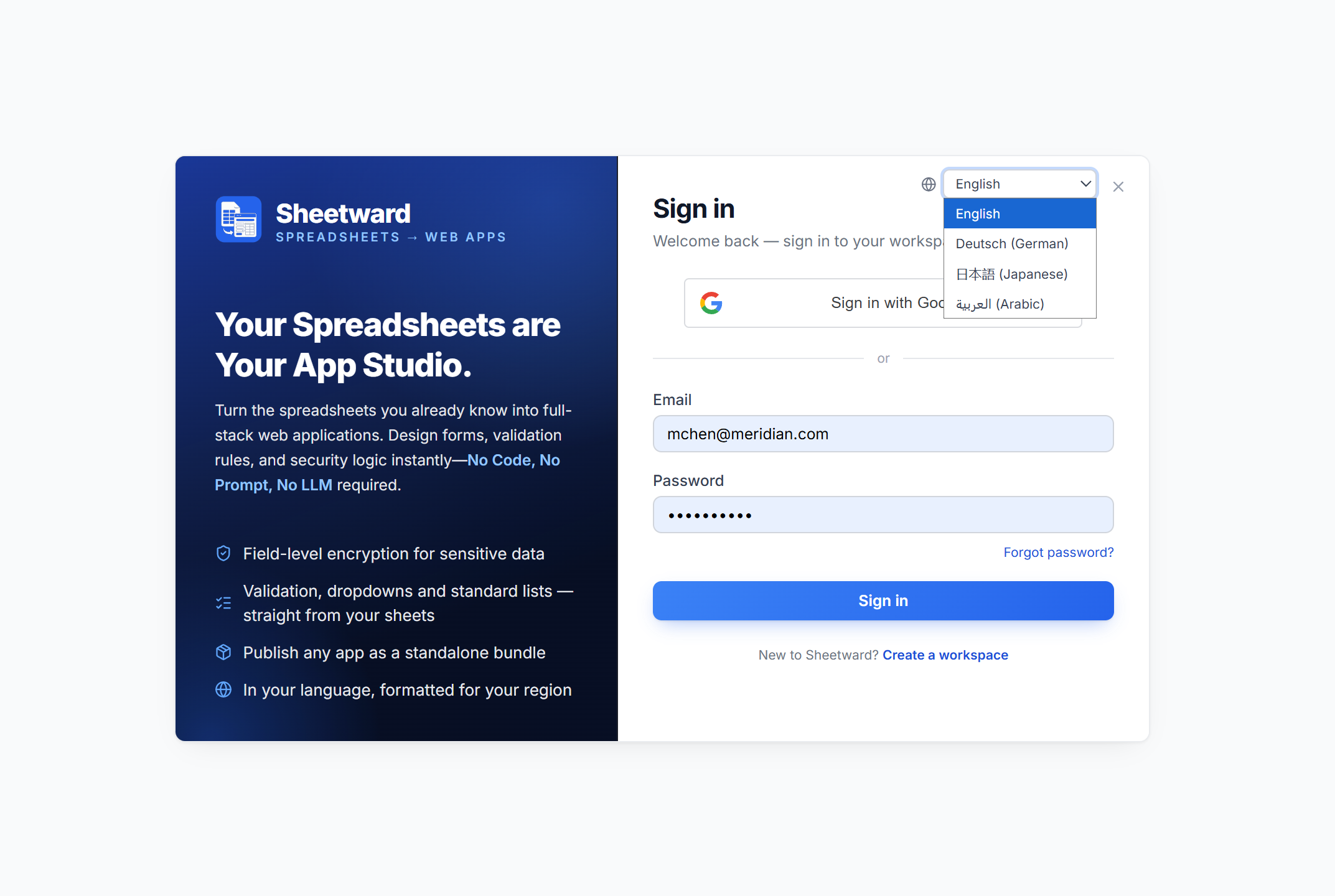
1. Sign in to your workspace — in your language.
Sheetward speaks English, German, Japanese and Arabic; choose yours right on the sign-in screen.
2. Your workspace home: your name, your logo, and every app at a glance.
153 records across 2 apps here — and each app is fully independent.
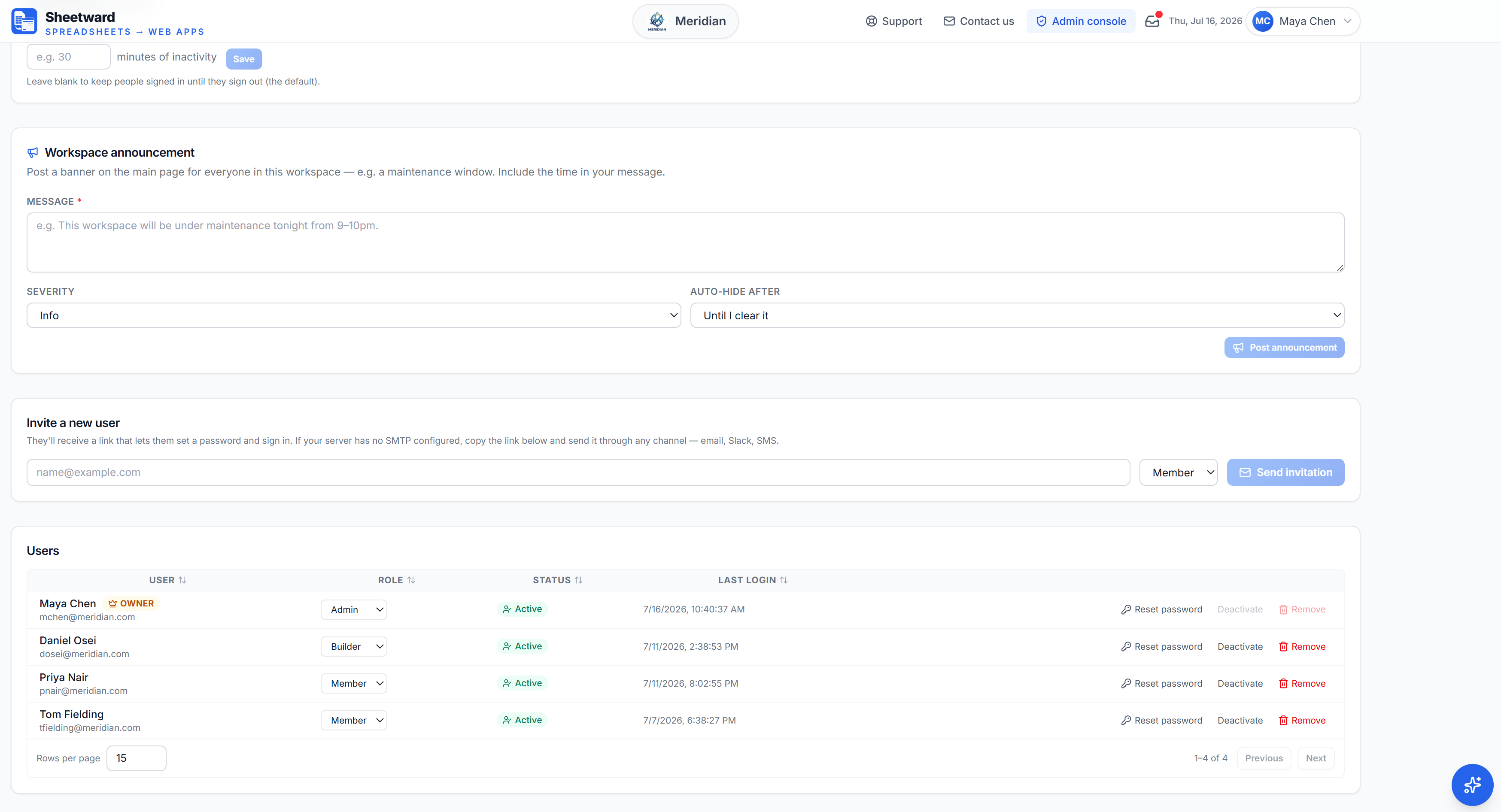
3. Invite teammates and give each a workspace role.
Admin, Builder or Member — sent as a secure link; no email server required.
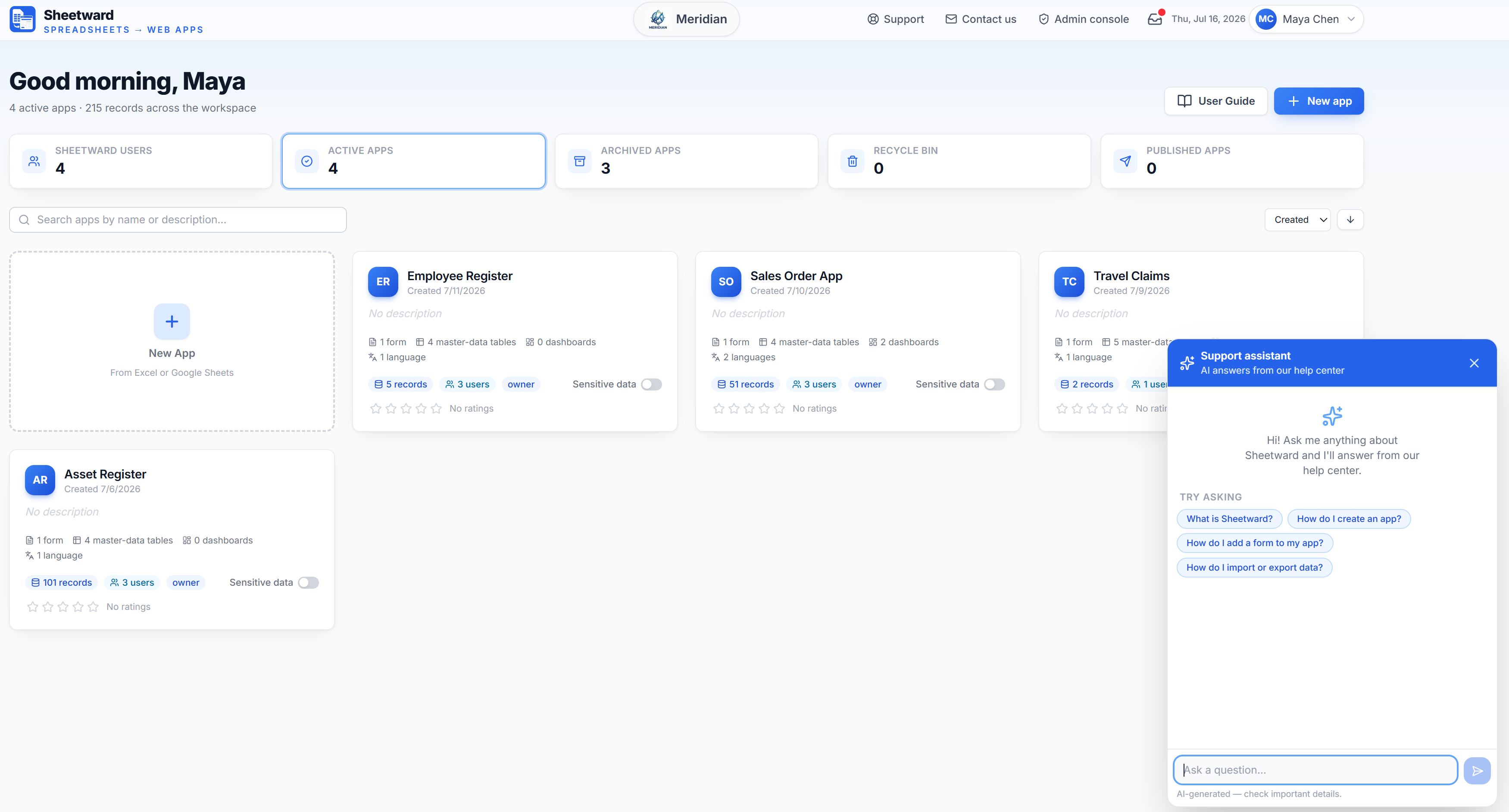
4. Stuck? The support assistant answers from the help center.
Ask anything about Sheetward and get an instant, cited answer — day or night.
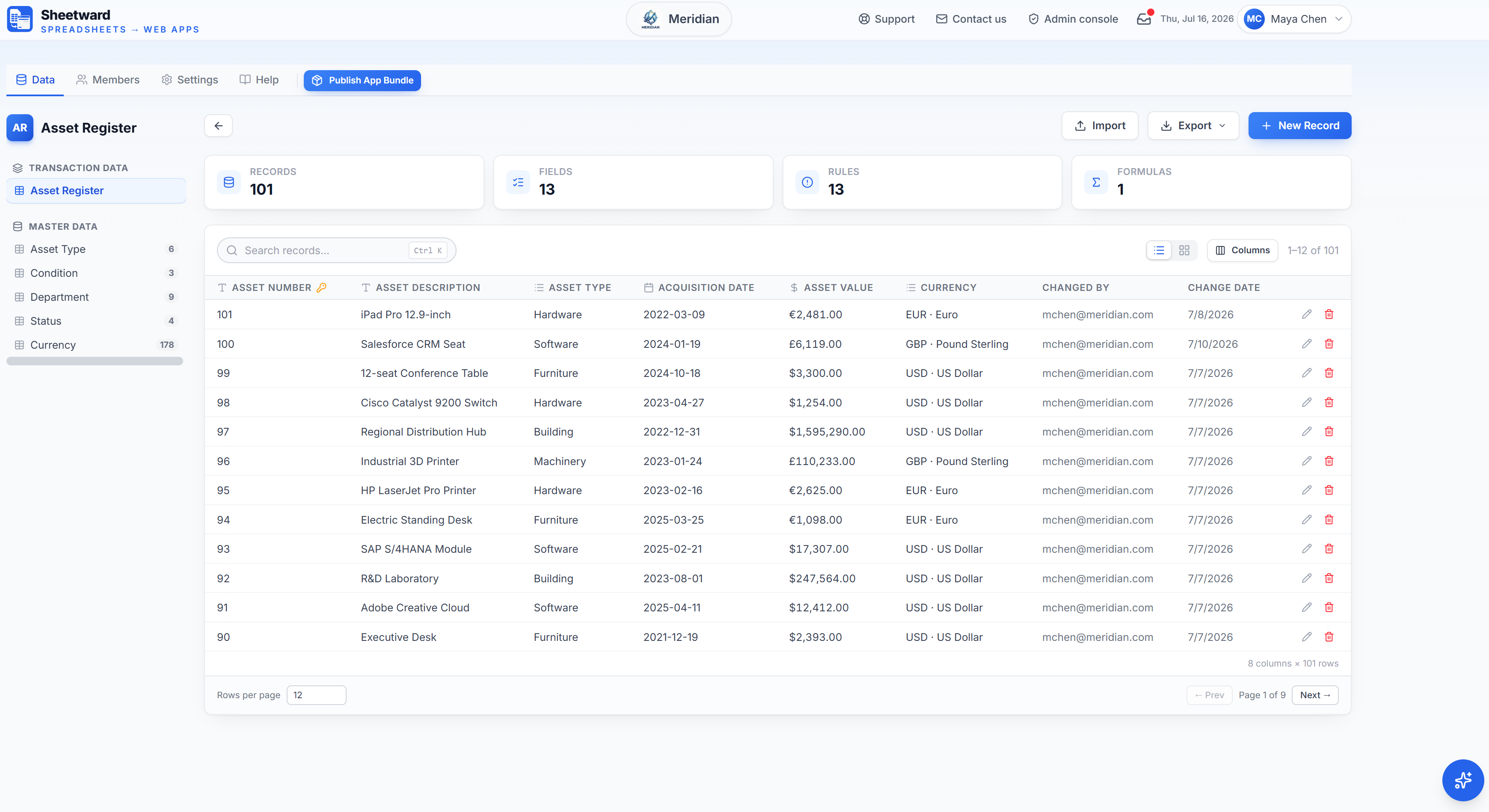
5. A real web app over your data — search, edit, import and export.
Live records with currencies and change history, ready to use.
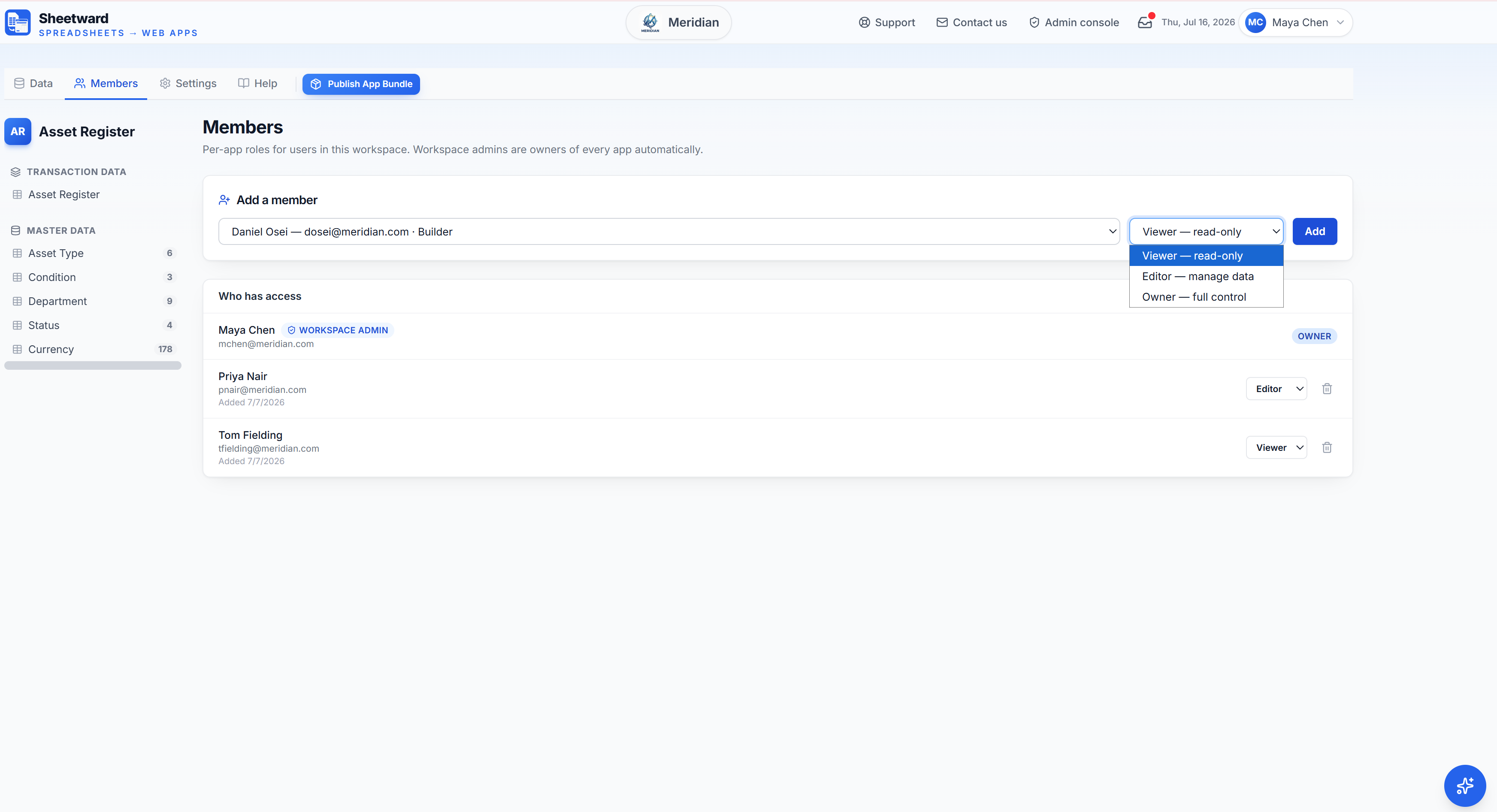
6. Assign per-app roles to control who can do what.
Owner, Editor or Viewer per app — workspace admins own every app automatically.
1. One form, many sections — header fields plus a line-items table, straight from the workbook.
Header totals recalculate from the line items as you type.
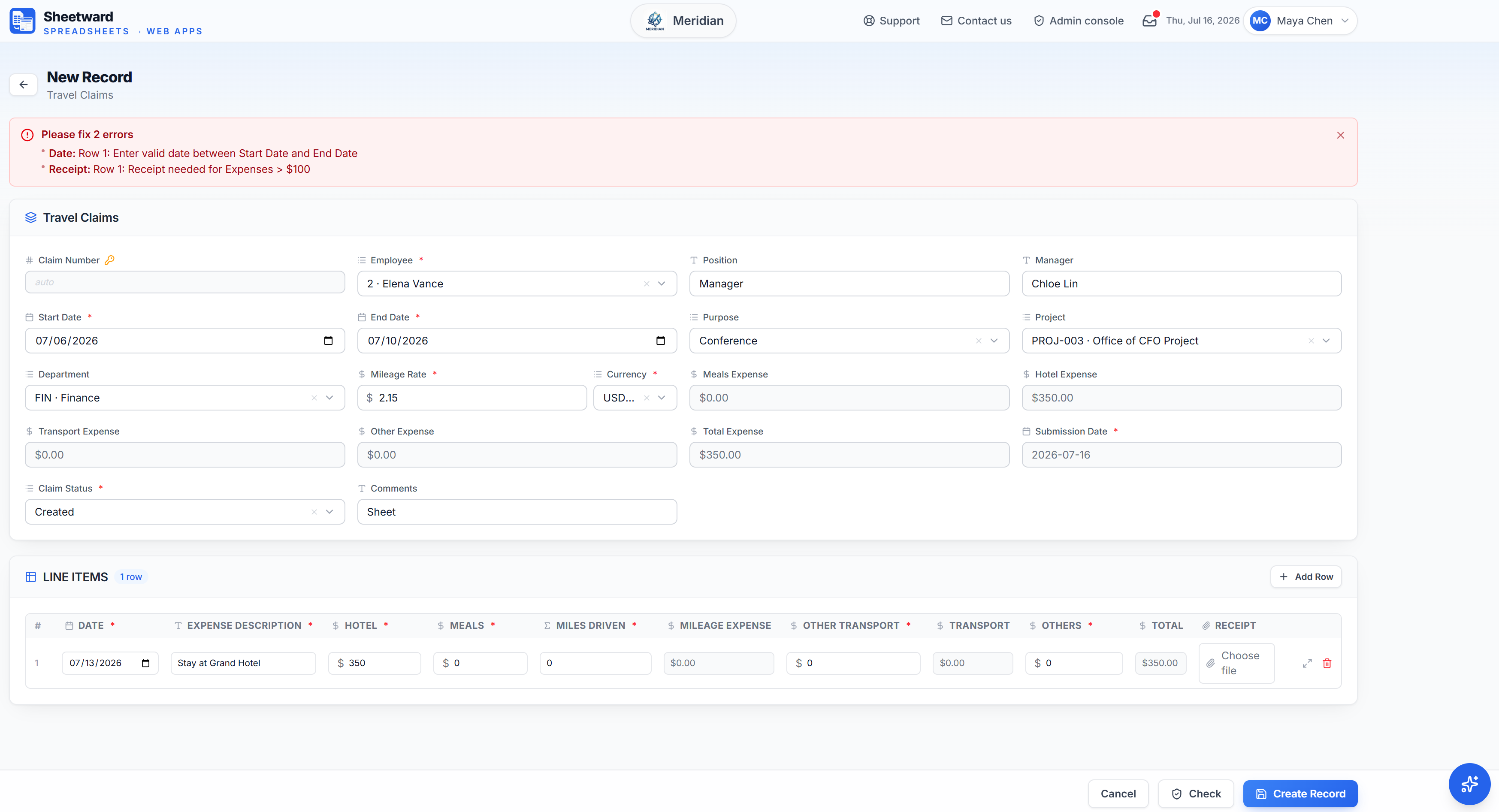
2. Workbook rules run on every entry — nothing invalid is ever saved.
Dates, required receipts, thresholds — written in plain language in the Rules sheet.
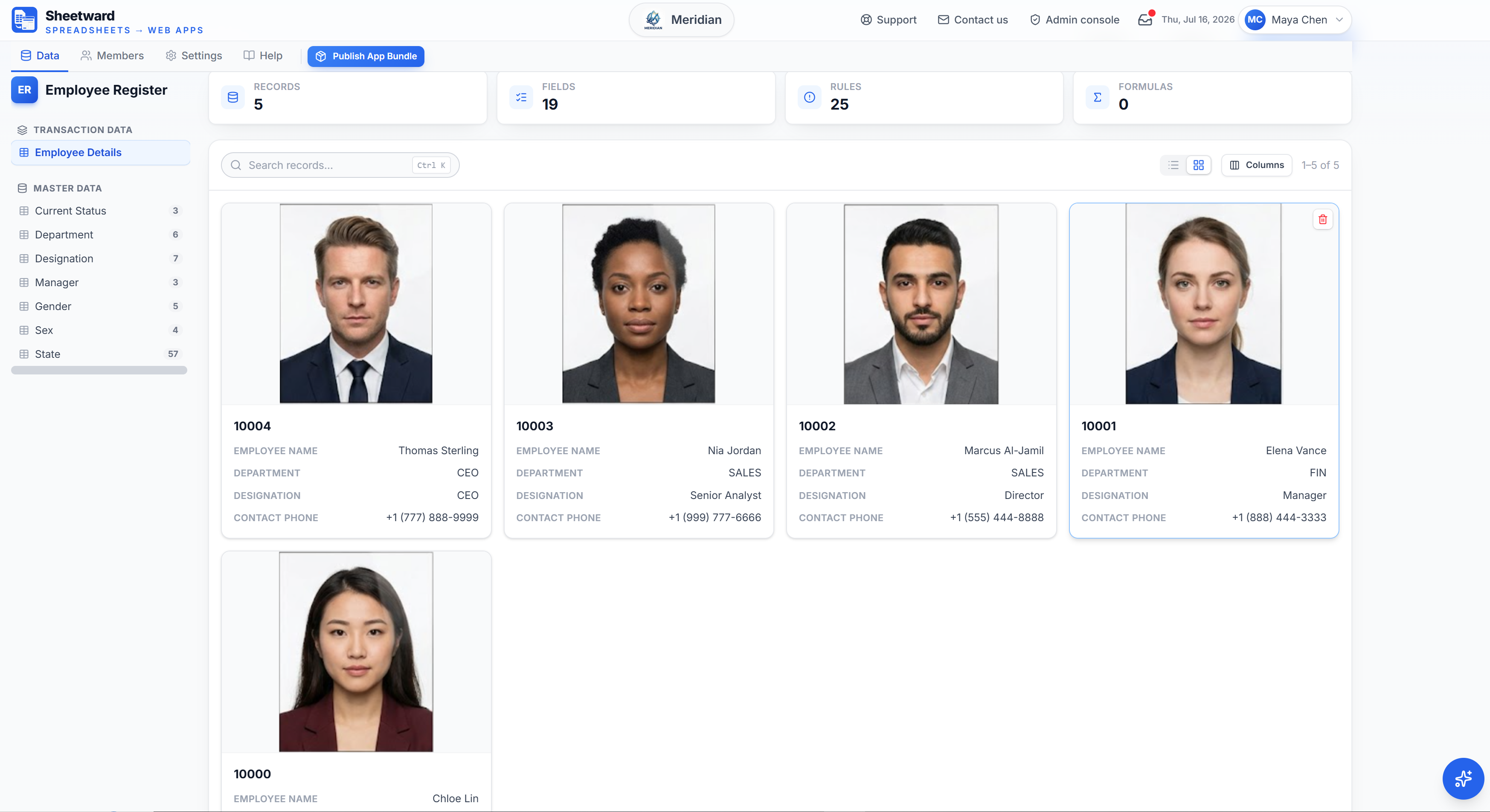
3. Records display as a dense list or as image-led tiles — one click to switch.
Tiles lead with the record's photo; the list stays compact for scanning.
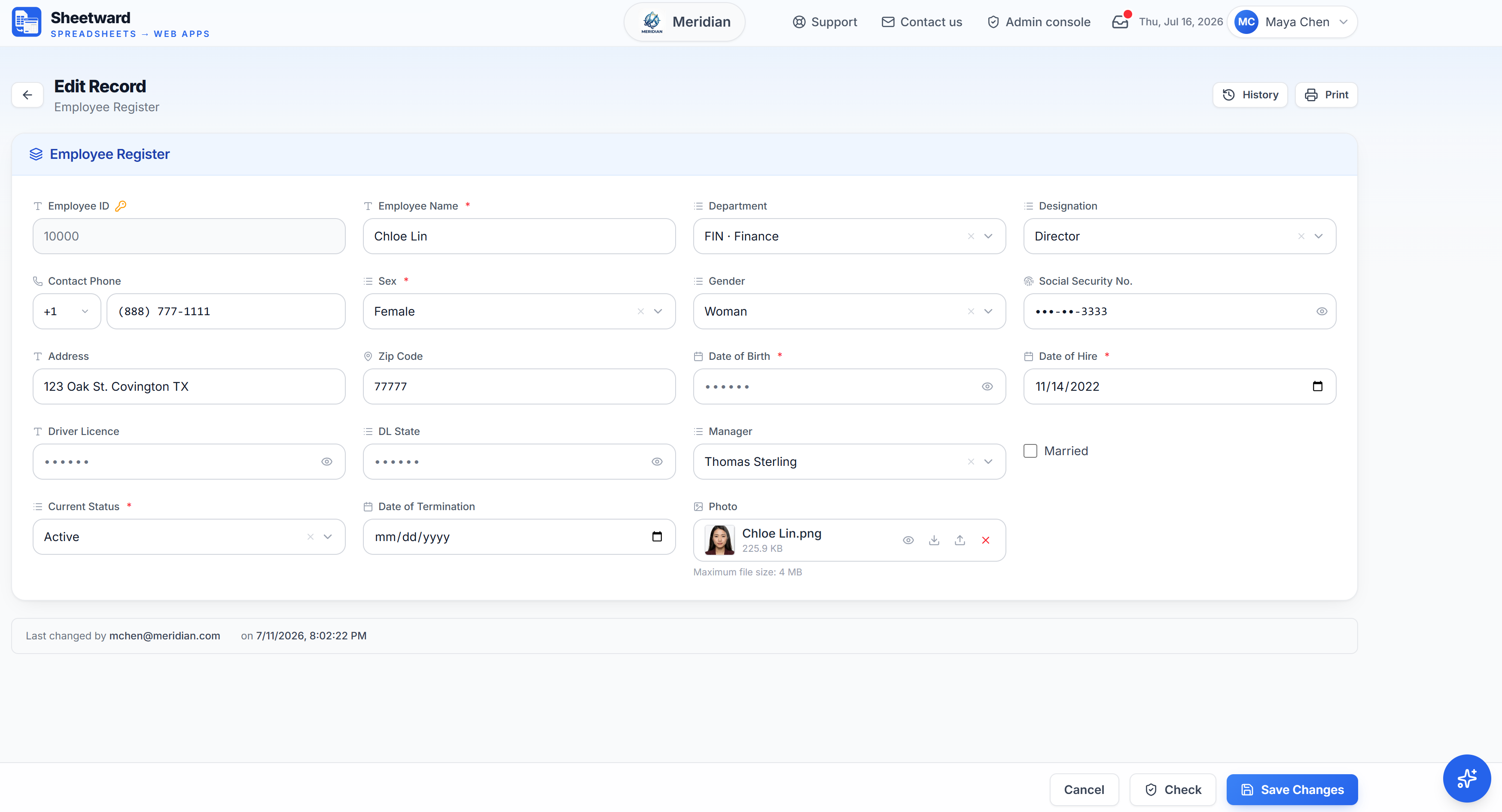
4. Mark fields sensitive in the workbook — viewers see masks, never the values.
The mask is applied on the server, so the real values never reach a viewer's browser.
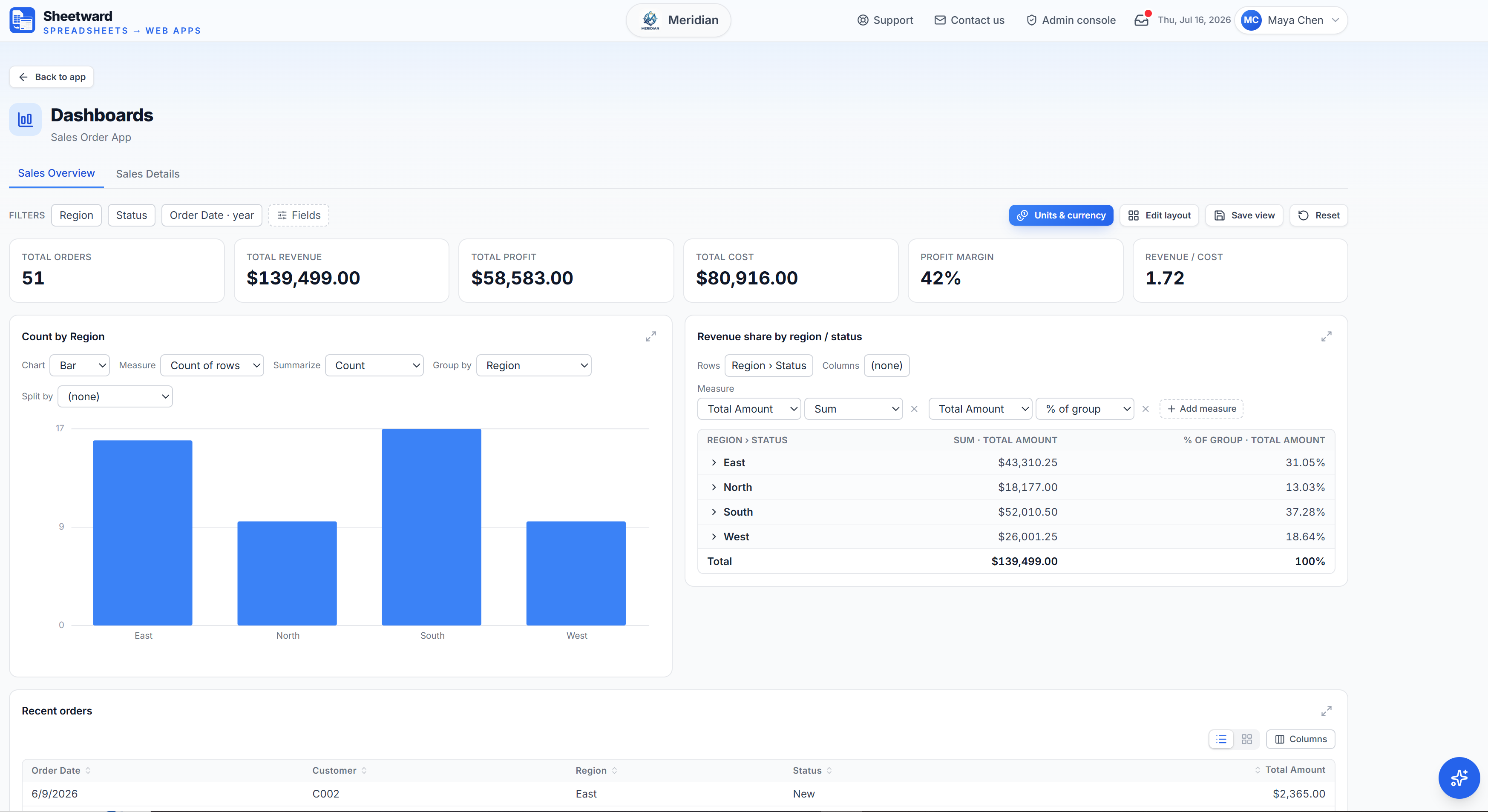
5. A Report_ sheet becomes live KPI tiles, charts and pivots — no BI tool needed.
Filter, drill down and rearrange; every viewer can save their own layout.
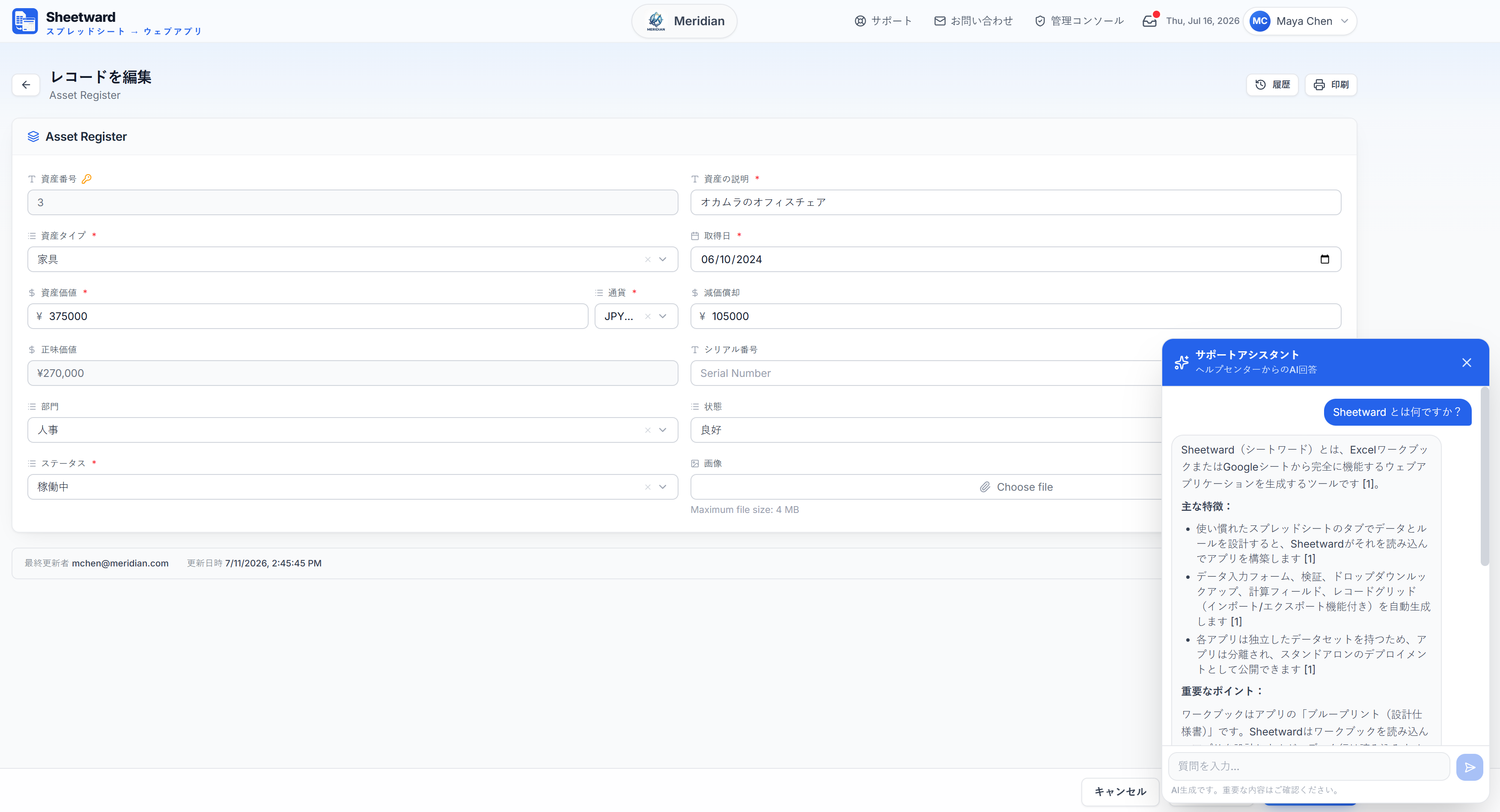
6. Ship the same app in several languages from one workbook.
UI, field labels and master data all switch with the viewer's language.
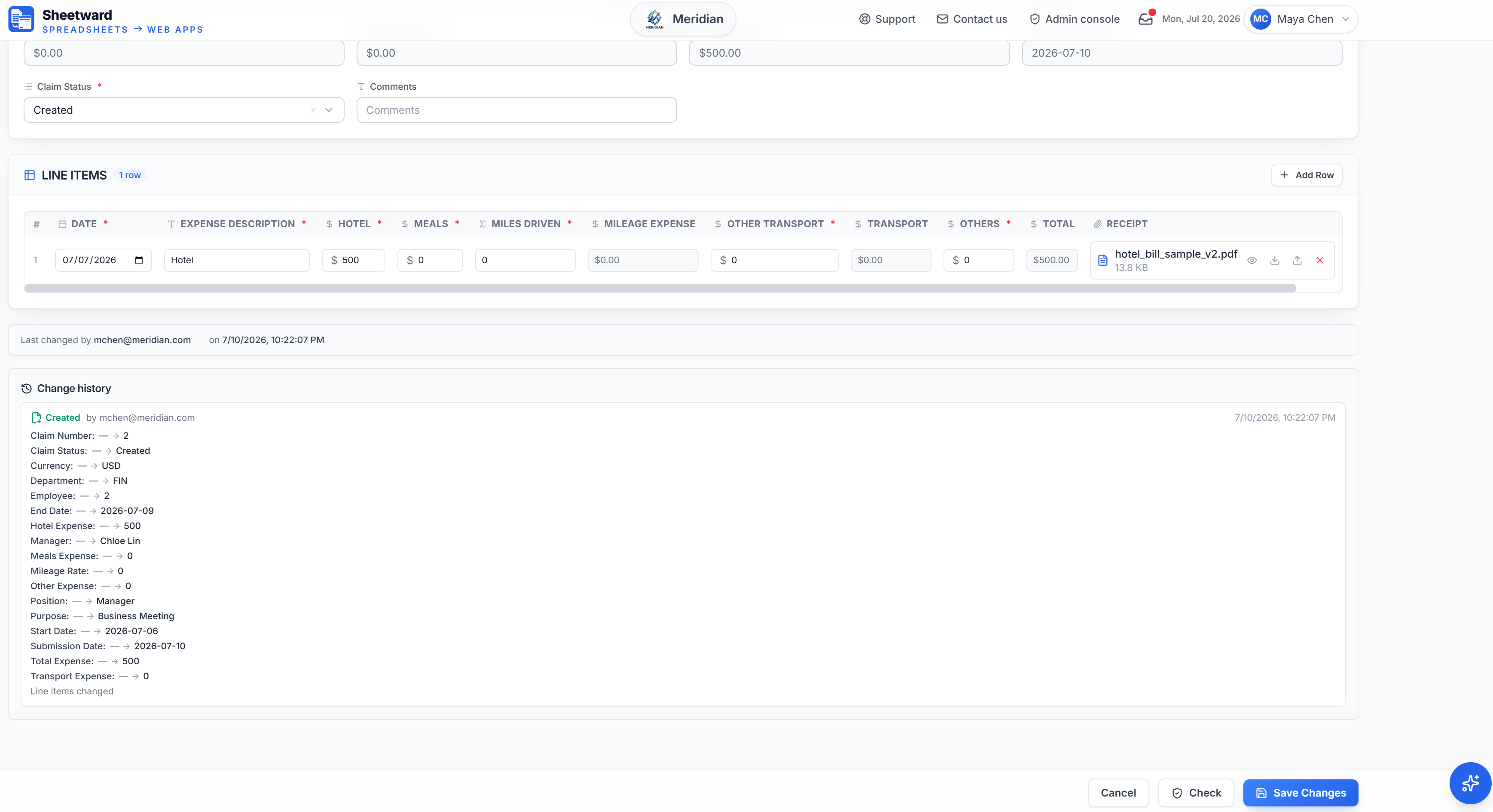
7. Every record keeps a full change history — who changed what, and when.
A field-by-field audit trail plus a "last changed by" stamp — on by default, no setup.
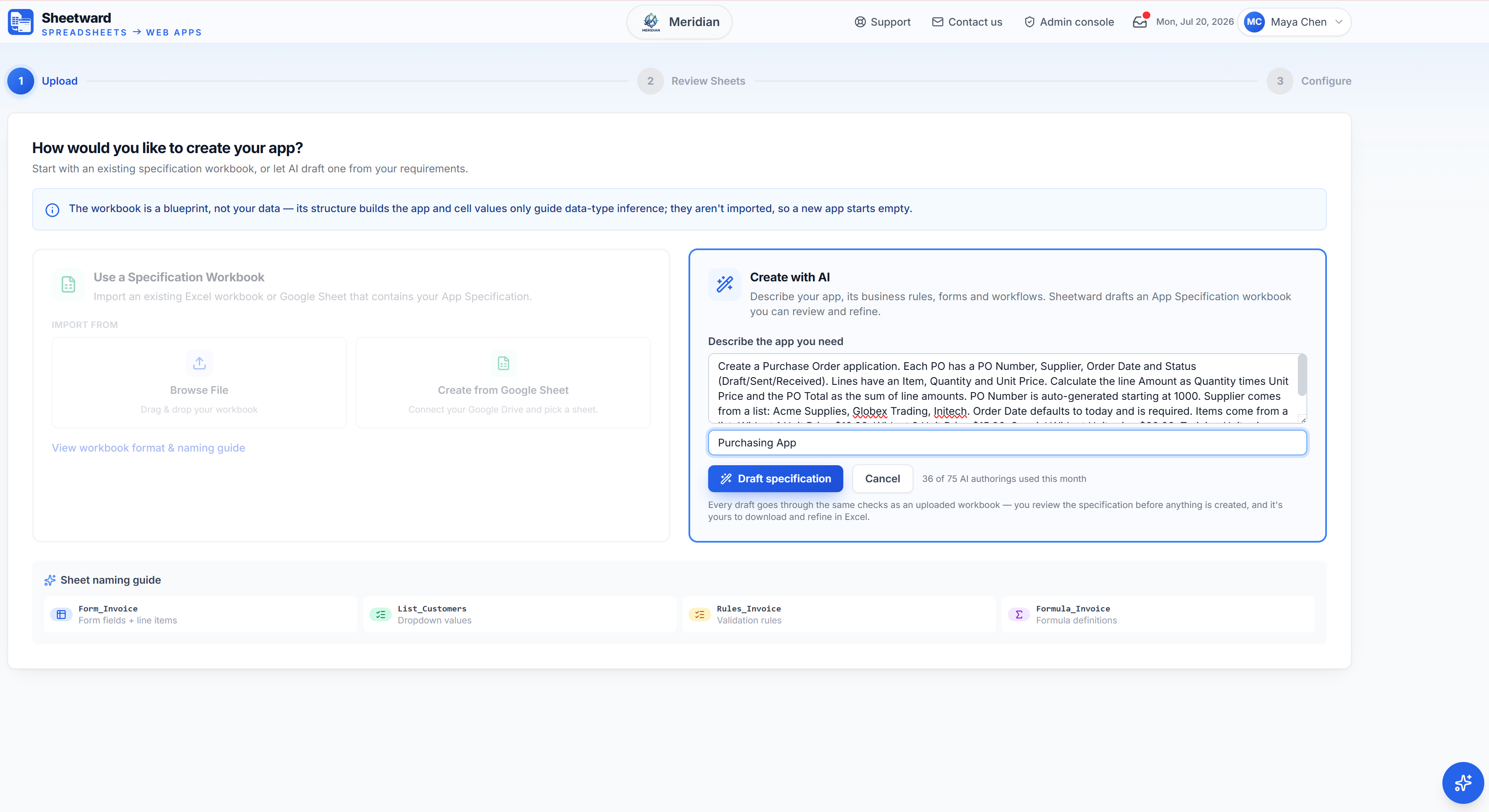
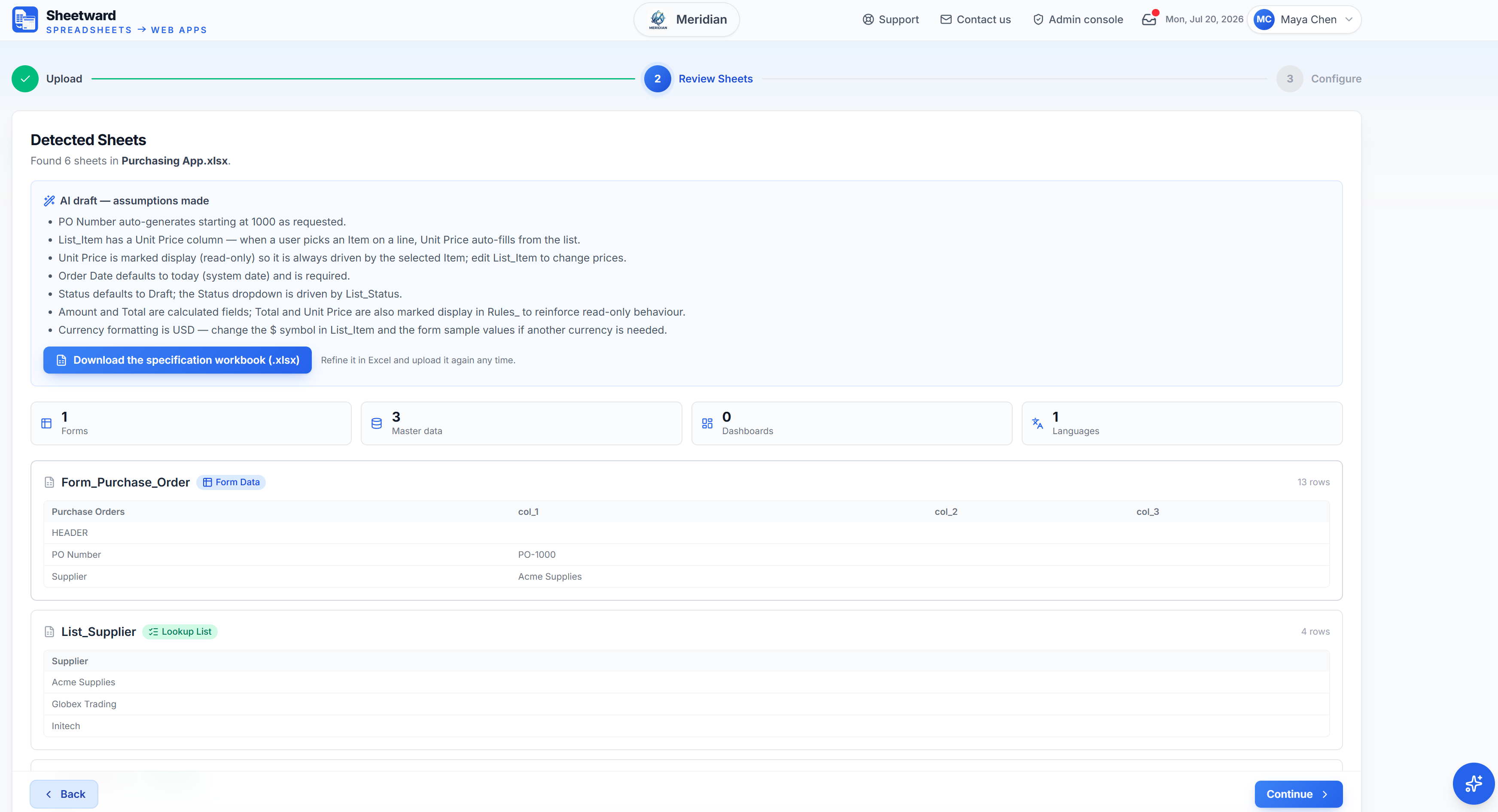
1. Pick “Draft with AI” on New App, describe the app in your own words, and give it a name.
Plain language in, specification out — name the fields, the lists, the rules, even a dashboard or extra languages.
2. The draft opens on the normal review step, with the model’s assumptions listed above it.
Every draft passes the same checks as an uploaded workbook — nothing is created until you confirm.
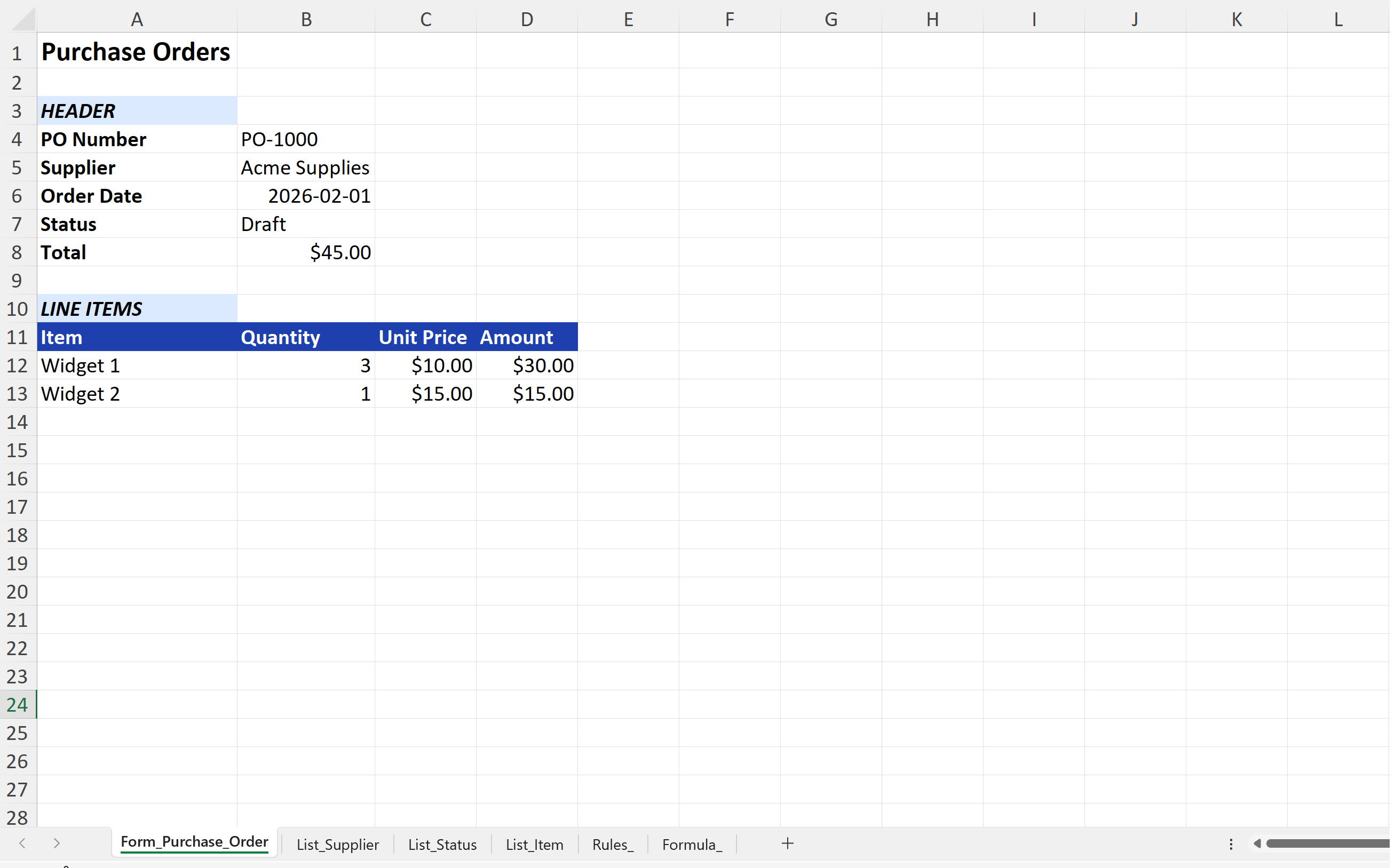
3. Download “‹App› Specification.xlsx” anytime, polish it in Excel, and upload it like any workbook.
The specification is always yours — the AI wrote a workbook, not a black box.
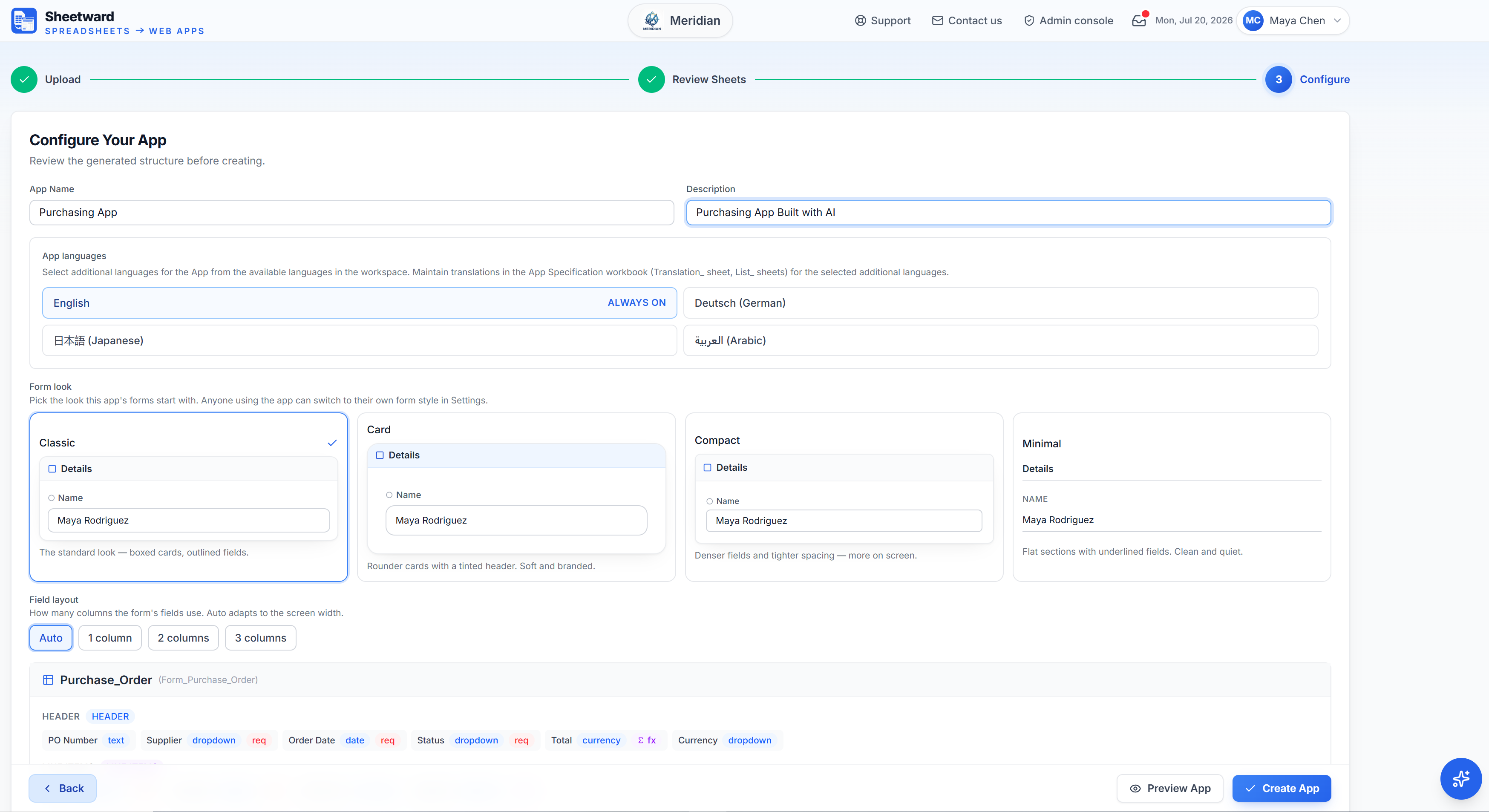
4. Check the drafted fields, pick a form look and layout, then click Create App.
Types, dropdowns and currencies all come from the specification — adjust anything before creating.
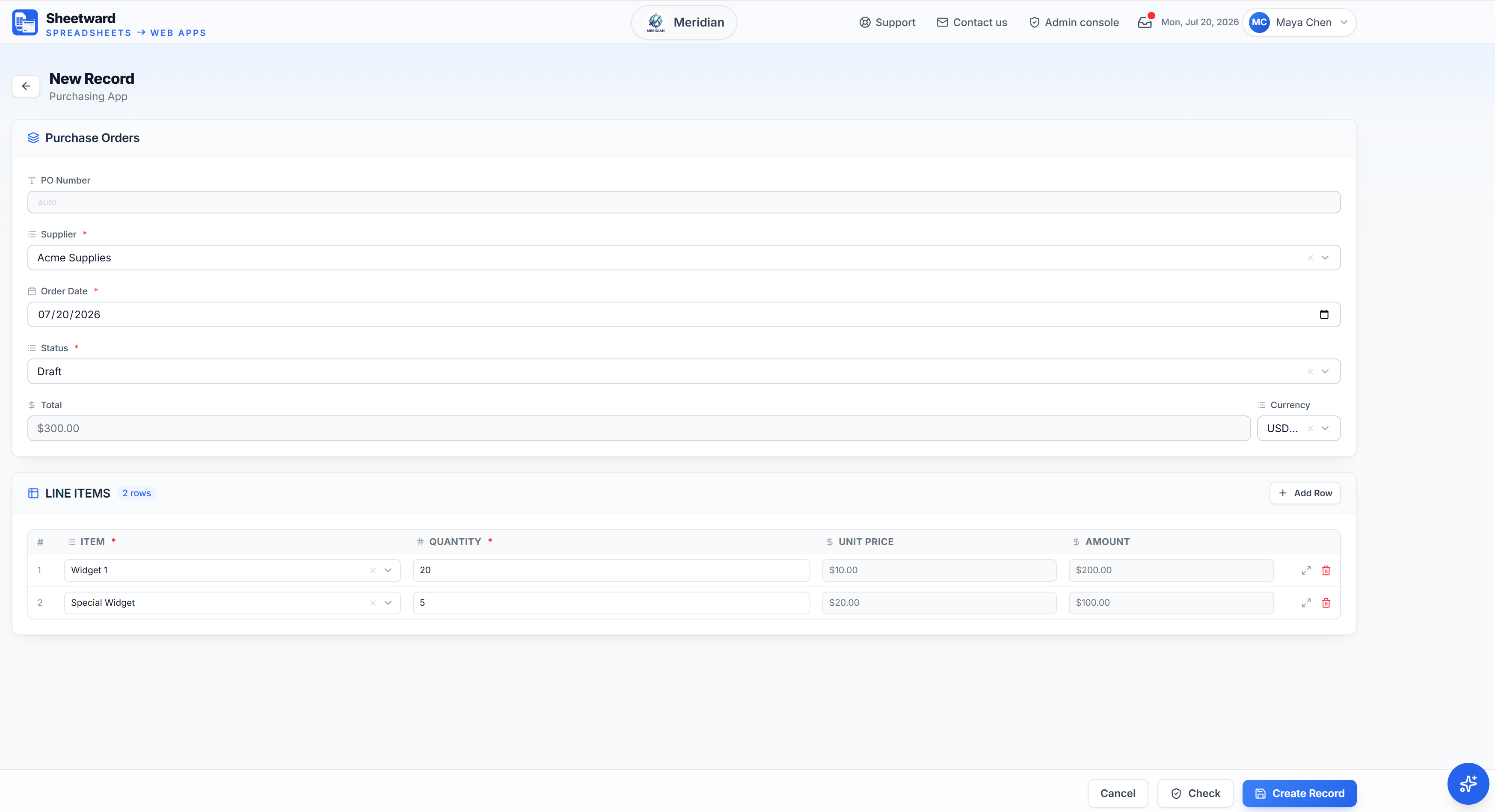
5. Create, and the app is live with its own database — validated forms, rules and lookups ready.
Built deterministically from the specification — the AI never touches the build.
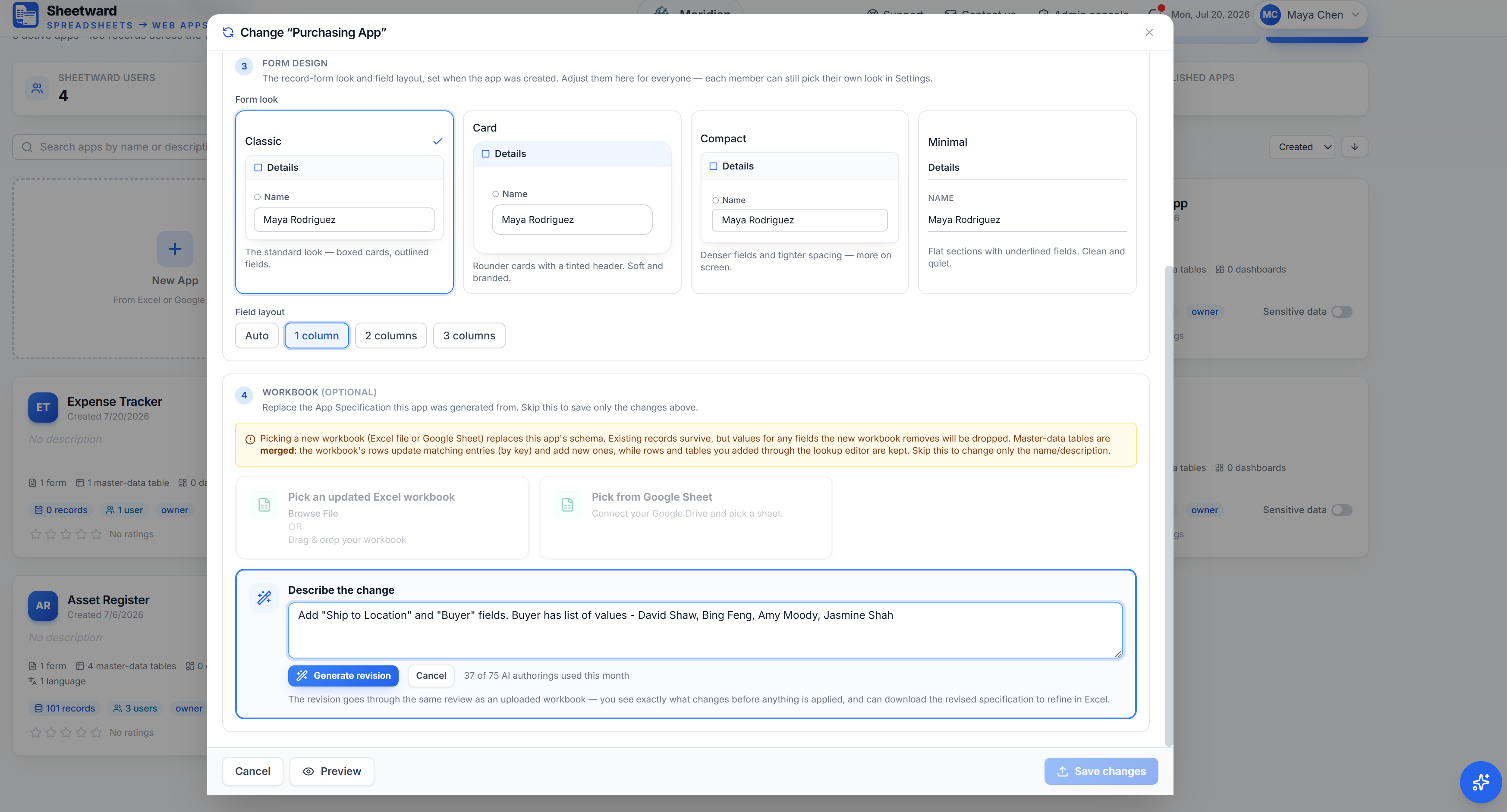
6. Later, describe a change — the AI edits the current specification and you approve the exact diff.
A change preview shows which fields are added or removed before anything is applied.
See it work
Sheetward in Action
Screen recordings of Sheetward building an app — one from an App Specification workbook, one from an app description.
From a workbook
An Excel specification goes in; a vendor-invoice app comes out — header fields, a line-items grid, totals and validation, ready to use.
From a prompt
Describe the app in plain language. Sheetward drafts the specification, you review it, and the purchasing app is built from what you approved.
AI, optional by design
AI drafts. You approve. Sheetward builds.
AI never builds your app. It drafts an App Specification workbook you review and approve — then the standard, deterministic Sheetward build turns that spec into the app. No LLM in the build path.
- 1
AI drafts
Describe the app in plain language and the AI writes the App Specification workbook — forms, master data, validation rules, formulas, even dashboards and extra languages. A blueprint, not a black box.
- 2
You approve
The draft opens on the same review step as any uploaded workbook, with the model’s assumptions listed. Refine it in Excel or in the app — nothing is created until you confirm.
- 3
Sheetward builds
Your approved specification runs through the standard, deterministic build — the same one an uploaded workbook uses. No LLM in the build path, so the result is auditable and repeatable.
Draft with AI
Start a new app from a description. The AI hands you a specification workbook to review and refine — you decide what ships.
Revise with AI
Later, describe a change. The AI edits the current specification and shows the exact diff — which fields are added or removed — for you to approve before anything is applied.
The App Specification is a workbook you own: download it, keep it, re-run it. Because the build is deterministic, re-generating the app can’t quietly change what already worked — the spec is the durable artifact, not a prompt you can’t reproduce.
Sheetward vs prompt-to-app AI buildersFeatures
Everything a real app needs — designed in cells.
The parts of an application that usually need a developer are exactly the parts your workbook already describes.
Validated forms
Required fields, formats with check digits (SSN, phone, UPC, routing numbers), ranges and conditional rules — straight from your Rules_ sheet, enforced on every save.
Draft with AI
Describe the app you need and the AI drafts the App Specification workbook — you review, refine and approve it, and Sheetward builds the app deterministically. The blueprint is always yours in Excel.
Dropdowns & standard lists
Master-data sheets become dropdowns, plus nine built-in standard lists — countries, states, currencies, languages, time zones and more — no lookup sheet needed.
Live formulas
Formula_ rows become computed fields that update as your team types — totals, derived values, auto-filled fields.
Multi-form apps
Several Form_ sheets become one app with multiple pages, headers with repeating line items, and per-form record grids.
Dashboards & analytics
Add a Report_ sheet and your app gets KPI tiles, an interactive pivot and charts — filter, drill down and save your view. No separate BI tool required.
Import & export
Excel, CSV, JSON and Google Sheets — exports round-trip back as imports, and business keys update rows in place instead of duplicating them.
Roles & workspaces
Invite teammates as admins, editors or viewers. Each app lives in a workspace with per-app membership and an audit trail of every change.
File attachments
Attach files to records with safe in-browser previews for images, PDFs and text — executable uploads are rejected outright.
Themes & branding
Four accent themes plus custom colors, light/dark/auto mode, layout density, and your company logo in the navbar.
Built-in AI assistant
A help assistant answers your team from your Knowledge Base and User Guide — grounded, cited, and private to your workspace.
Publish as a bundle
Any app can be published as a standalone, self-contained deployment that runs on your own server — data and all.
Multilingual & regional
Sheetward speaks your team’s language — the platform and your apps run in English, German, Japanese or Arabic (with right-to-left support), and dates, numbers and currency format automatically for each person’s region.
Security
On by default. Not a checkbox.
Spreadsheets full of personal data get emailed around. Apps built with Sheetward don't — sensitive fields are protected the moment your blueprint marks them.
You own your data — and the app.
- AES-256-GCM field encryption
- Card numbers stored last-4 only
- Export to Excel, CSV or JSON anytime
- Standalone bundle — run it on your own server
- Audit log of every admin action
- 4 languages, Arabic right-to-left included
Field-level encryption
Sensitive values are encrypted with AES-256-GCM before they reach the database, with per-app derived keys — the database provider never sees plaintext.
Card numbers: last 4 only
Credit-card fields are validated once, then stored truncated to their last four digits. The full number is never persisted — anywhere.
Masked by default
SSNs and card fields render masked with a reveal toggle, and exports mask them for every role unless an app owner explicitly opts in.
Support that can’t peek
Platform support sessions are read-only and never receive raw sensitive values — masking is enforced server-side, not in the UI.
Audited end to end
Every record carries who changed it and when; workspace-level actions land in an audit log the admin can review.
Backups & recovery
Scheduled backups, a recycle bin for deleted records, one-click export and non-destructive restore — your data is yours to keep and to get back.
Pricing
Start small. Change anytime.
This is our planned launch pricing — one flat price per workspace, no per-user fees. Join early access to be first in when we open.
Request early access- No credit card required.
One flat price per workspace.
You pay one monthly price for the whole workspace, and every plan ships the complete builder. Plans differ in how much you can put in them — never in what you are allowed to build.
- No per-seat math
- No AI credit top-ups
- No paid add-ons
- No usage sliders
You will not find a pricing calculator on this page. That is the point — if you need one to work out next month’s bill, the pricing is the problem.
Starter
Try it free. No credit card required
Free
- 6 users (1 admin · 5 members)
- 3 apps
- 500 MB storage
- 2 dashboards per app
- 5 AI authorings
- 1 additional language
- Community support
Pro
For growing teams shipping real apps.
Everything in Starter, plus:
- 28 users (1 admin · 2 builders · 25 members)
- 10 apps
- 10 GB storage
- 6 dashboards per app
- 15 AI authorings / month
- AI support assistant
- Manual backup & export
- Save 17% vs monthly
- 3 publish app bundles
- 2 additional app languages
Max
Scale your organization
Everything in Pro, plus:
- 115 users (5 admins · 10 builders · 100 members)
- 40 apps
- 50 GB storage
- 10 dashboards per app
- 75 AI authorings / month
- Priority support
- Automated daily backups
- Save 17% vs monthly
- 20 publish app bundles
- 3 additional app languages
Enterprise
Unlimited apps & users, with room to scale.
Custom
Everything in Max, plus:
- Unlimited users
- Unlimited apps
- Unlimited storage
- Unlimited dashboards per app
- Unlimited AI authorings
- Unlimited publish app bundles
- Unlimited additional languages
- Priority support + SLA
- Automated daily backups
Prices in USD. Planned launch pricing — final prices are confirmed at launch. Early-access members hear first.
Get early access
Sheetward opens to everyone at launch. Join before then and these stay yours.
- 60-day trialDouble the standard 30 days at launch — no credit card
- Founding priceLocked for as long as you stay subscribed
- Personal onboardingBring a workbook, leave with a working app
- A say in the roadmapEarly members shape what we build first
Plus the Founding Builder badge on your workspace — you were here first.
That didn't work — please check your email address and try again.
FAQ
Questions, answered.
Does the data in my workbook become the app’s data?
No — and that’s by design. Sheetward reads your workbook as a blueprint: sheet layouts, field names, data types, lookup lists, rules and formulas. Cell values are only used as samples to infer each field’s type. A new app starts empty; your team enters records in the app or bulk-imports them, where every row is validated and audited.
Do my users need Excel?
No. Only the person designing the app touches a workbook. Everyone else uses a normal multi-user web application in their browser — forms, dropdowns, search, exports — on any device.
Can I change the design after the app exists?
Yes. Upload a revised workbook with the Change action: the schema migrates, existing records are preserved, and master-data lists are updated in place (matched rows update, new rows insert — manual additions survive).
Where does the app’s data live?
Data belonging to one app is isolated from every other app, enforced by the database itself rather than by application code alone. Sensitive fields are encrypted at the application layer before they reach the database, card numbers are stored last-4 only, and you can export everything to Excel, CSV or JSON whenever you want.
Can I run an app on my own server?
Yes — any app can be published as a standalone bundle: a self-contained deployment with its data, ready to run on your own infrastructure, independent of Sheetward hosting.
What skills do I need?
If you can structure a spreadsheet — name columns, keep a lookup tab, write a simple rule — you can build a full-stack web app. There is no code, no SQL and no devops in the workflow.
Can my app work in other languages and regions?
Yes. Sheetward itself runs in English, German, Japanese or Arabic — pick your language at sign-in or in Settings, with right-to-left support for Arabic. Each generated app can offer the languages you choose; anyone whose language an app doesn’t include simply sees it in English. And everywhere, dates, numbers and currency display in each viewer’s own regional format, while the stored data stays standard.
How does Sheetward use AI in creating and modifying Apps?
Sheetward lets you create and modify Apps using AI prompts. Sheetward’s “Draft with AI” generates App Specification workbooks in Excel — forms, master data, validation rules, formulas, dashboard definitions and translations for additional languages. After review, those Excel workbooks generate Apps through the standard Sheetward build process. Similarly, Sheetward’s “Revise with AI” modifies Apps — adding new fields, calculations, validations or languages.
What happens when I reach a plan limit?
You are warned long before anything breaks. Once a workspace passes 90% of its storage or bandwidth limit, every member sees a banner, so an admin can free space or move up a plan while everything still works normally. At the limit Sheetward stops the action, not the workspace: a new record or upload is refused with a message naming the exact limit, while everything already stored stays readable, searchable and exportable. File storage and bandwidth also get a grace band above the limit before anything is blocked at all. Nothing is ever deleted for being over a limit, and there is no overage invoice — a limit is a limit, not a meter that keeps charging.
Can I cancel?
A monthly plan can be cancelled at any time from the admin console. It simply stops renewing and stays fully usable until the period you have already paid for runs out, and you can resume it before then if you change your mind. Annual plans can be cancelled in their first two weeks or during the final 30 days of the term — with one exception worth knowing before you buy: if you have published a standalone app bundle during an annual term, that term can no longer be cancelled, because you already hold a copy of the app that runs without us. After a plan expires there is a grace period in which an admin can still restore the workspace before anything is removed.
If I leave, what do I take with me?
Everything, in formats you can open without us. Records export to Excel, CSV or JSON whenever you like, master-data lists ride along in the Excel export, and a workspace backup packages the lot as a single zip. The App Specification stays a workbook you own outright — it never turned into a proprietary file only we can read. And on an annual plan you can publish a standalone bundle: a self-contained copy of the app with its own database, ready to run on your own server, independent of Sheetward hosting. That is the difference between exporting your data and keeping your app.